The Evolution of Modern Architecture: A Look at the Past and Future

  • Reading time:3 mins read

This is a single blog post layout by OceanWP.

You can completely change the layout (sidebar, no sidebar, edge to edge), control the position of the elements and their appearance with a user-friendly loop builder as well as style and customize all other aspects of your website.

Blog posts are the best tool to boost your online presence and SEO, so make it count by creating a presentable layout with a few simple clicks!

The best part? You are in full control over each and every post individually (change header style, menu, footer, top bar, or just about anything!) which enables you to make the best out of WordPress hassle-free.

Did we happen to mention you will get all of this for free? Get started with OceanWP today!

Lorem ipsum dolor sit amet, consectetur adipiscing elit. Integer nec odio. Praesent libero. Sed cursus ante dapibus diam. Sed nisi. Nulla quis sem at nibh elementum imperdiet. Duis sagittis ipsum. Praesent mauris. Fusce nec tellus sed augue semper porta. Mauris massa. Vestibulum lacinia arcu eget nulla. Class aptent taciti sociosqu ad litora torquent per conubia nostra, per inceptos himenaeos.

Vestibulum lacinia arcu

Quisque cursus, metus vitae pharetra auctor, sem massa mattis sem, at interdum magna augue eget diam. Vestibulum ante ipsum primis in faucibus orci luctus et ultrices posuere cubilia Curae; Morbi lacinia molestie dui. Praesent blandit dolor. Sed non quam. In vel mi sit amet augue congue elementum. Morbi in ipsum sit amet pede facilisis laoreet. Donec lacus nunc, viverra nec, blandit vel, egestas et, augue. Vestibulum tincidunt malesuada tellus. Ut ultrices ultrices enim. Curabitur sit amet mauris. Morbi in dui quis est pulvinar ullamcorper. Nulla facilisi.

Lorem ipsum dolor sit amet, consectetur adipiscing elit. Integer nec odio. Praesent libero. Morbi lacinia molestie dui. Sed cursus ante dapibus diam. Sed nisi. Nulla quis sem at nibh elementum imperdiet. Duis sagittis ipsum. Morbi lacinia molestie dui. Praesent blandit dolor. Sed non quam. In vel mi sit amet augue congue elementum. Morbi in ipsum sit amet pede facilisis laoreet. Donec lacus nunc, viverra nec, blandit vel, egestas et, augue. Vestibulum tincidunt malesuada tellus. Ut ultrices ultrices enim. Curabitur sit amet mauris. Morbi in dui quis est pulvinar ullamcorper. Nulla facilisi.

Curabitur sodales ligula in libero. Sed dignissim lacinia nunc. Curabitur tortor. Pellentesque nibh. Aenean quam. In scelerisque sem at dolor. Maecenas mattis. Sed convallis tristique sem. Proin ut ligula vel nunc egestas porttitor. Morbi lectus risus, iaculis vel, suscipit quis, luctus non, massa. Fusce ac turpis quis ligula lacinia aliquet. Mauris ipsum. Nulla metus metus, ullamcorper vel, tincidunt sed, euismod in, nibh.

Integer lacinia sollicitudin massa. Cras metus. Sed aliquet risus a tortor. Integer id quam. Morbi mi. Quisque nisl felis, venenatis tristique, dignissim in, ultrices sit amet, augue. Proin sodales libero eget ante.

John Doe

Quisque volutpat condimentum velit. Class aptent taciti sociosqu ad litora torquent per conubia nostra, per inceptos himenaeos. Nam nec ante. Sed lacinia, urna non tincidunt mattis, tortor neque adipiscing diam, a cursus ipsum ante quis turpis. Nulla facilisi. Ut fringilla. Suspendisse potenti. Nunc feugiat mi a tellus consequat imperdiet. Vestibulum sapien. Proin quam. Etiam ultrices. Suspendisse in justo eu magna luctus suscipit. Sed lectus. Integer euismod lacus luctus magna. Curabitur sodales ligula in libero. Sed dignissim lacinia nunc. Curabitur tortor. Pellentesque nibh. Aenean quam. In scelerisque sem at dolor. Maecenas mattis. Sed convallis tristique sem. Proin ut ligula vel nunc egestas porttitor. Morbi lectus risus, iaculis vel, suscipit quis, luctus non, massa. Fusce ac turpis quis ligula lacinia aliquet. Mauris ipsum. Nulla metus metus, ullamcorper vel, tincidunt sed, euismod in, nibh.

Continue ReadingThe Evolution of Modern Architecture: A Look at the Past and Future

AL Pragma Explorer – a new AL extension

  • Reading time:3 mins read

There is a cool new extension out there for AL developers that you should really check out: AL Pragma Explorer. The extension is almost as amazing as the work behind it, because even though this extension is published under my publisher name, it’s not really just mine. This was a team effort of my group at the BC TechDays 2022 preconference workshop, and I am so proud that we actually managed to pull this thing off.

So, here’s the story.

Continue ReadingAL Pragma Explorer – a new AL extension

AL Object ID Ninja logical ranges overview

  • Reading time:2 mins read

Long time no see, eh? 😳 I won’t offer no excuses, but I have been plenty busy with things that you’ll benefit in some way or another, far more than you’d benefit from me writing here. So, let’s jump straight into it.

First things first. I just can’t express my gratitude to all of you who use it every day. Just a few numbers for you to feel the scale of it. At the moment of writing this post, there have been:

  • 17.382 installs
  • 5.369 repositories managed by Ninja
  • More than 3.500 users actively use Ninja every day
  • More than 4.700 users actively use Ninja every week
  • More than 3.300 repositories being worked in every day.

This is huge. Thank you all for finding Ninja an obviously indispensable tool to manage your object ID assignments.

Now back to the point of this post. This week there have been a couple of releases, and one of the most important new features is logical ranges. That’s the feature that allows you to assign object IDs from ranges that do not necessarily match those in your app.json file. There are several use cases for this, and the feature is quite flexible.

Today, I did another live session where I presented this feature. If you want to learn about how it works and what good it is for, check it out:

That’s it. Thanks for using Ninja, and I am looking forward to hearing your feedback.

What’s the next feature you’d like Ninja to include?

Continue ReadingAL Object ID Ninja logical ranges overview

AL Object ID Ninja Scheduled Maintenance Announcement: October 9 at 19:00 CET

  • Reading time:3 mins read

For all of you using AL Object ID Ninja, please read this post. There will be scheduled maintenance of AL Object ID Ninja back end on October 9, 2021, at 19:00 CET (UTC +2). The expected downtime is 30 minutes. During the maintenance, you will not be able to use AL Object ID Ninja to assign object IDs.

Behavior during the maintenance

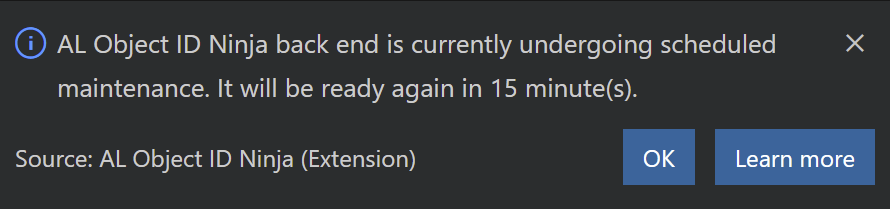
During the maintenance, the back end will send the 503 Service Unavailable response to all requests. When AL Object ID Ninja receives this status, it will show a message like this:

What is this maintenance about?

In my previous post, I explained the reasons for the maintenance that is going to happen this week. After weighing in and out several approaches, I have come up with a plan slightly different than what I announced in the previous post. So, during this maintenance, the following is going to happen:

  • All existing app information will be moved from a Standard-tier Block Blob container to a Premium-tier Block Blob container. This will provide a slightly better performance, and will reduce the costs by roughly 47%. Standard-tier costs less for volume of stored data, but more per transaction, and since Ninja is using low storage volume with high transaction count, the cost reduction will be substantial.
  • All blobs belonging to an individual app will be consolidated into a single app blob. In “v1” app information is spread around multiple individual blobs which allows slightly faster performance and lower access concurrency. However, benchmarking has shown that there is no substantial performance benefit to existing approach as compared to single-blob-per-app approach. Furthermore, since the back end already correctly handles concurrent access and since chances of actual concurrent write are microscopical, not much is gained by spreading app data across multiple blobs. The overall benefit of having a single blob is substantial, as there will be far less blob read operations as compared to the current situation.
  • After the migration is completed, a new version of back end will be deployed that will return the 410 Gone response to all “v1” requests. This version will have “v2” endpoints available.
  • When the migration starts, a new version of AL Object ID Ninja (2.0.0) will be deployed that will access new “v2” endpoints.

What do you need to do?

After the maintenance completes, you should update AL Object ID Ninja extension as soon as possible. For most of you, this will happen automatically. To make sure everything is ready, verify that AL Object ID Ninja is updated to 1.2.8 in your instance of Visual Studio Code before you first start working after the maintenance.

IMPORTANT (if you have your own back end)

Some of you are using your own back end. I will push the new version of the back end to GitHub latest on Thursday evening. Please keep an eye on the repository. When you see a commit about back end “v2”, pull the changes and deploy them at any point after the scheduled maintenance starts, but before your developers start using AL Object ID Ninja (probably on Monday morning).

Continue ReadingAL Object ID Ninja Scheduled Maintenance Announcement: October 9 at 19:00 CET

Important Announcement for AL Object ID Ninja

  • Reading time:13 mins read

If you are using AL Object ID Ninja already then you may want to read this post. If not, then first install AL Object ID Ninja, then read this post 😀

Since its launch three weeks ago, this extension has exploded far beyond my expectations. As of this morning, Ninja has been installed 5.916 times, there are 2.047 Business Central apps that use Ninja to assign object IDs, and there are currently around 13.37 million blob read and write operations per week performed on my Azure Storage and around 6.75 million Azure Function calls per day. These numbers nearly doubled in the past ten days, and while there is a definite cap to how far this can grow, I expect all of this to grow at a steady rate for the foreseeable future.

Which brings me to the important part. AL Object ID Ninja is free, and it will stay free. Right now there is absolutely no fear of it even remotely approaching the limit I’ve set (at the moment, Ninja is costing on average €1 per day against my €125 monthly allowance that comes with my Visual Studio subscription, so there is aaaaaa lot of room to grow. However, since Ninja grew beyond my wildest dreams already, and since I know it’s far from hitting the roof any time soon, if nothing changes, in a couple of months it could hit a €3 per day threshold that would make me pretty uncomfortable.

That said, I have been working on some important back-end improvements to keep costs (much) lower while providing even more functionality. The reason why I went there wasn’t costs at all – it was actually some new functionality I wanted to add that I realized would drive costs a bit up, so I had to do something.

All of this is to finally announce this important announcement: at some point during the weekend, there will be a major upgrade to the AL Object ID Ninja back end, and over the course of the next week there will be two new versions of AL Object ID Ninja extension. The old extension will not work with new back end, and new extension will not work with old back end.

That’s it. If you care about nitty-gritty details, then read on.

Continue ReadingImportant Announcement for AL Object ID Ninja

AL Object ID Ninja v1.2.0 – plus some Azure lessons learned

  • Reading time:17 mins read

First things first. Yesterday evening, I’ve released AL Object ID Ninja v1.2.0 and there is really nothing new that you’d care about, functionally speaking. Check the changelog if you will, but trust me, you won’t be really blown away. But yes, unfortunately, it did merit a full minor version rather than just a patch number increase.

That’s it. If you only care about what’s new, then this is where you stop reading. But if you care to know what kind of a rocky ride I’ve had yesterday wrestling with Azure and fighting like mad to keep this service free, then read on.

I won this fight, by the way 😎

Continue ReadingAL Object ID Ninja v1.2.0 – plus some Azure lessons learned

AL Object ID Ninja v1.1.0 released

  • Reading time:2 mins read

I have just released version 1.1.0 of AL Object ID Ninja. Here’s what’s new.

Merge synchronization

In previous versions, you could only synchronize full information. This type of synchronization simply recorded in the back end whatever it finds in the front end. For example, if the back end had object IDs 50100..50105, and the front end only has object IDs 50104..50106, then the full synchronization, will drop whatever was recorded previously, and will replace it with 50104..50106.

This type of synchronization may be good enough for teams who are only just starting development in AL, and have no existing repos. They can just start assigning numbers, and then synchronize later as needed.

However, if you are an active team with dozens of developers working in different branches, and you start using AL Object ID Ninja after objects already exist in your repo, if you only run synchronization from master branch, then any of object IDs already assigned in those other development branches will not be visible to AL Object ID Ninja. Instead of preventing object ID collision, AL Object ID Ninja would lead you right into it in this case.

For all these scenarios, you have Update synchronization.

Continue ReadingAL Object ID Ninja v1.1.0 released

AL Object ID Ninja

  • Reading time:9 mins read

One of the biggest obstacles to AL team development (is there any other kind?) is object IDs. IDs are supposed to be easy: just pick the next free one and off you go. AL Language even helps by suggesting the next available one through IntelliSense. But you are most likely not the only developer on your team. As soon as you add another developer to equation, and both of you use the built-in AL IntelliSense auto-suggest feature, you are inevitably heading towards object ID collision. The more developers there are, the more active your repository is, the more likely the collision.

Obviously, without some kind of a back-end that coordinates object ID assignment – preferably in real time – is absolutely necessary. And teams have come up with various solutions to this problem. They include:

  • “Who cares!”: the most heroic one, no object ID collision will ruin your day. Bring it on – you say! I’ll handle you – you say! These teams spend a lot of time resolving collisions post-factum.
  • Object “reservations”: you create an empty object of the desired type, push just that, create a PR that does nothing by that, and launch into the Hail Mary mode until your PR gets merged. The slower your validation pipeline is, the more likely it is that more than one developer will be saying their Hail Marys at the same time, and guess what – Mary will help one of them.
  • “Hey, folks”: you yell to announce to everyone that you are about to take an object ID. Or, in more advanced teams, you run a Teams team (uh, did I mention “team?”). This approach is not too robust, but generally yields better results than the above two.
  • Excel: the ways this tool gets used, geez. It’s a spreadsheet calculator, for Pete’s sake, but people have been using it for everything ranging from shopping lists to, well, object ID assignment sheets.
  • “When you have a hammer, every problem you see is a…” BC! The ways this tool gets used, too! Well, heck, yeah, isn’t it so freaking obvious that people will just create a BC app and deploy it internally so that everyone can use it. BC has nearly all facilities you need (that none of the above approaches does): primary key validation and concurrency. This is a very advanced stage in the evolution of object ID collision management solutions.
  • Automation. Yeah, baby! Now that there is a BC back end, and BC has APIs, let’s build an API that gives you next number, and then let’s do some front-end that fetches that from the back end, and then let’s somehow embed into VS Code. There is at least one tool that I know of, that does exactly this. And good that I didn’t know of it that Saturday morning nine days ago, because I would have zero motivation to take this evolution one big step further.

This is where AL Object ID Ninja joins the show! It’s zero-configuration, crazy-fast, mind-bogglingly simple solution for no-collision object ID assignment in AL. If you haven’t already (and if you are using Waldo’s AL Extension Pack, chances are you already have) go fetch yourself a copy.

Continue ReadingAL Object ID Ninja

Inside Git: Branches

  • Reading time:2 mins read

It has again been a while since I blogged – or video-blogged for that matter. I won’t offer any excuses – I’ve been very busy over the past month. I delivered two public webinars, both of which were fully booked and ended up very successful. The first one was Leveraging Git, and it was the first public redelivery since January. The second one was CI/CD from AL Developer’s Shoes, and this was the first iteration of this one that practically consumed all free time I had. That one is to blame for me not blogging or broadcasting for more than four weeks.

Cool, now that I am done with the excuses, it’s time to move on. Today I’ve finally had time to go live again with a new episode of Vjeko.live. Since I am so busy with Git these days (and webinars are only a part of my being busy with Git, in fact), I’ve decided to deliver another short “inside Git” session. This time it was branches, and I went into what branches actually are in Git, how Git stores them, what happens when you create a branch, check out a branch, or delete a branch.

If you missed the live broadcast at 4PM today, you can follow it at your own convenience here:

If you want to learn more about branches, don’t miss my next public webinar in two weeks: Git Branching Models and Strategies.

See you in the cloud!

Continue ReadingInside Git: Branches

Git storage – SHA1

  • Reading time:18 mins read

If you have ever worked with Microsoft’s Team Foundation version control tools, it wasn’t easy to switch to Git. That’s not because Git was complicated – no, nothing like that at all! It was simply because you had to forget almost everything you thought you knew about version control, and then learn it anew.

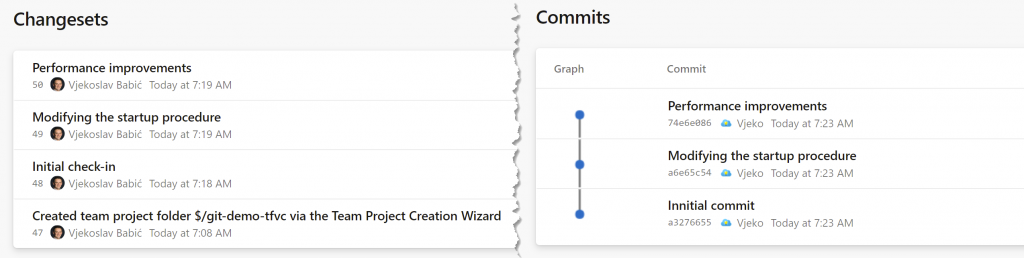
There are many fundamental differences between Git and TFVC, and one of the more obvious ones to any newcomer to Git is this:

If it wasn’t obvious on the first go, TFVC is on the left, Git is on the right

No, it’s not about the caption here. Indeed, TFVC calls individual snapshots of changes “changesets” and Git calls them “commits”, but that’s just terminology – the term in itself is not a fundamental difference. I am after something else here.

Continue ReadingGit storage – SHA1