You’ve noticed that I’ve been absent for a long time. No posts, no activity. Well, blogging takes time, and I am a sort of a perfectionist. Writing posts sometimes takes hours, there have been posts that took me days. Let me not mention how many articles sit unfinished. Most of them make no sense at all to complete anymore.
I was thinking of video blogging. Eric Hougaard has a pretty cool video blog, and he actually inspired me to start thinking in that direction. But having created dozens of videos myself, and being perfectionist and all, creating videos takes a lot more time than writing posts.
So, I’ve decided to try something else: live blogging. Yeah, right, I always get on a train five years after it takes off, but better late than never, they say.
To make the long story short, today at 15:30 CET (that’s 3:30 PM EST) I kick off.
The place you want to be is https://vjeko.com/live or you can simply scan the QR code below.
Good. If you want to know how this new live blog will work, I invite you to join me today, or to watch the recording afterwards. No spoilers, no trailers. Just pure BC fun (Sheldon Cooper style 🤣)
The community often criticizes Microsoft for adding new platform features only when Microsoft needed them. Well, it has been a bit too harsh – Microsoft did add improvements in other situations, too. But still, if you compare it to other Microsoft’s languages like TypeScript or C#, the AL language isn’t really advancing.
Looking back at C/AL, the AL language has really brought a lot of improvements. We have native JSON types, HTTP API, interfaces, overloads, and a lot more. But still, the overall change of the AL language was minor improvement, rather than a real evolution that transition to VS Code could have allowed.
Here’s the list of top five things I’d absolutely love to see in AL. And I have strong reasons to believe that all of them would be fairly easy to implement for Microsoft. Let’s get started.
I’ve never truly understood why we could explicitly commit a transaction, but we could only implicitly roll one back. There is a universe of difference between throwing an error (and ending the call stack), and rolling back (and continuing execution).
There was always a way to roll back and go on, sure. Wrap the entire thing in a if Codeunit.Run() block, throw an error as the last thing inside that codeunit, and there you go. Problem solved. Well, not quite.
Long time no see, but that’s how it gets every now and then, I guess… Anyway, I am still alive, still kicking, just don’t get to blog as much as I’d hope for, it’s work, and life and universe and everything.
So, I am back with not a typical “Vjeko” post, just a simple AL opinion piece. A tip, without a trick.
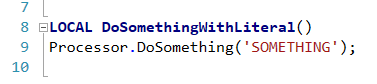
One of the problems we’ve all suffered from in the old days of C/AL (who remembers that still, anyway) was inability to define real text constants. One thing we all avoided was using hardcoded Text literals, like this:
It was not only about the sheer scariness of using Text literals in C/AL, stuff that if left unchecked could cause process issues, something nobody in the ERP world (especially those on the business end of it) likes. Arguably, the worst thing about this kind of code was total lack of reusability. If you had to reuse the literal, you would have to write it again:
Yeah, the mismatch (or typo, whatever you prefer) is intentional to prove my point. You could mistype it, or somebody may decide to change it and then forget to change it in all places, or… stuff happens, you know. It was no good.
There were no constants, and it sucked.
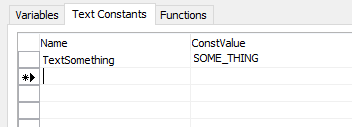
Yeah, yeah, there *were* TextConst constants, but that’s not it. The moment you did this:
… somebody could come in and “fix” it like this:
And there was no way for you to prevent them. There goes your discoverable extension, things break up and your users start yelling your way.
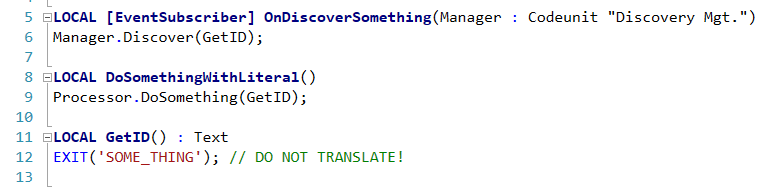
Back in those pre-historic days, I’ve seen people work around this problem like this:
The “constant” is coded in one place, other place call the wrapper function, and world goes on. That was the way to do it in C/AL, truly.
Fast forward back to present. I’ve got myself in the middle of refactoring a chunk of code migrated from C/AL to AL a while ago. It’s full of “pluggable” things that identify themselves to various discoverers, and it’s full of “constants” coded with this function-that-returns-a-hardcoded-literal pattern.
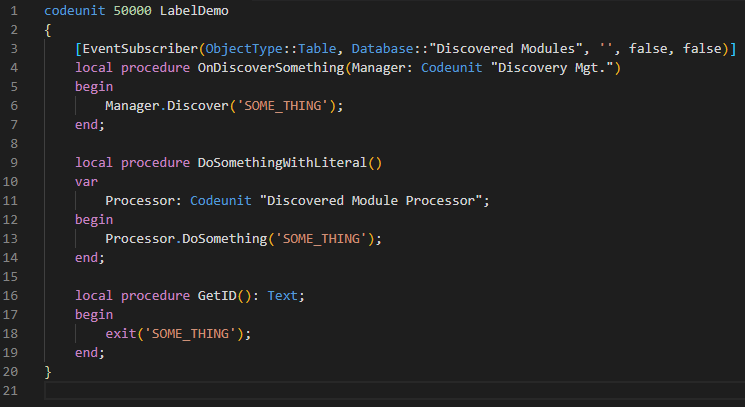
While this worked miracles in C/AL, in AL we actually have a far better way to handle this. Labels. Yeah, fells like I am discovering hot water or sliced bread or something, but please, for the record, don’t do this:
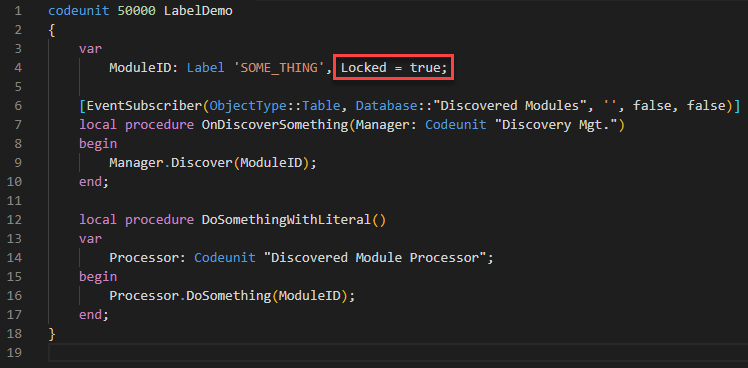
Instead, do this:
If you set the Locked property to true, you are making sure nobody inadvertently translates it, and you keep it a bit cleaner. This is especially true if you have multiple constants – listing them in your var block will be much cleaner than creating a function a piece.
Here endeth the lesson. No rocket science, just an easy one to document my train of thoughts for posterity. Everyone is entitled to my opinion, after all 😁
You might have noticed that I had some problems with pictures on this blog. Some posts simply didn’t show any of them, and I’ve got quite some reports that they aren’t working. Unfortunately, I’ve been so busy recently that I really didn’t have time to look into it.
A few days ago, a regular visitor of this blog that goes by the name of Bjarki took time to figure out what’s going on. He posted a comment about his finding, and that’s truly amazing. Thanks, Bjarki! 😀
Apparently, when I moved my blog to a new server, for some reason, some of the pictures got referenced with the staging URL and that URL remained in my blog database. Bjarki’s hint explained to me that the fix may be simpler than I feared. I did a search and replace (using the amazing Velvet Blues Update URLs plugin for WordPress) and voila!
I hope I get time soon to do other stuff on my blog, I know you are waiting for the continuation of the control add-ins supercharged series. It’s coming, it really is.
True, there was no episode 1, not on this blog. But if Star Wars can start with episode 4, I don’t see why can’t I start with episode 2. Especially when Waldo has already written episode 1.
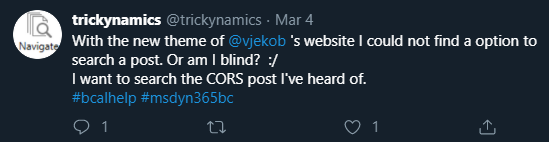
So yes – apparently, up until a few minutes ago – with the new theme my blog has been sporting for a while, it was impossible to search my blog. Somehow, for some reason, the theme I applied didn’t expose the search button in the header, as most modern themes do, and I didn’t notice.
But Twitter did notice.
And then Waldo fixed it:
Well, in any case, it’s there now. Not really in the most prominent place (it’s right in the footer, just scroll down) but for now, take it as is. When I have more time to work on my blog and blog about serious things, I may move this search feature around a bit.
I’ve been absent for a while – sometimes it’s difficult to find time for blogging even when I want it. Anyway… here’s the last post in the introductory series of posts that explain my NAV TechDays 2019 demos. In this code example, I explain the difference between typical development and production build configurations, and I show how to configure gulp accordingly.
After a short absence, I am back. The next lesson in the Control Add-ins Supercharged series I am introducing Babel.
“Babel is a JavaScript compiler”, says babeljs.io. So, what’s the big deal, you may ask? The big deal is that Babel will take your super-fancy high-end future-generation JavaScript code that barely any browser supports, and turn it into something that even Internet Explorer can run. In theory, at least. In practice, it’s a bit more complicated.
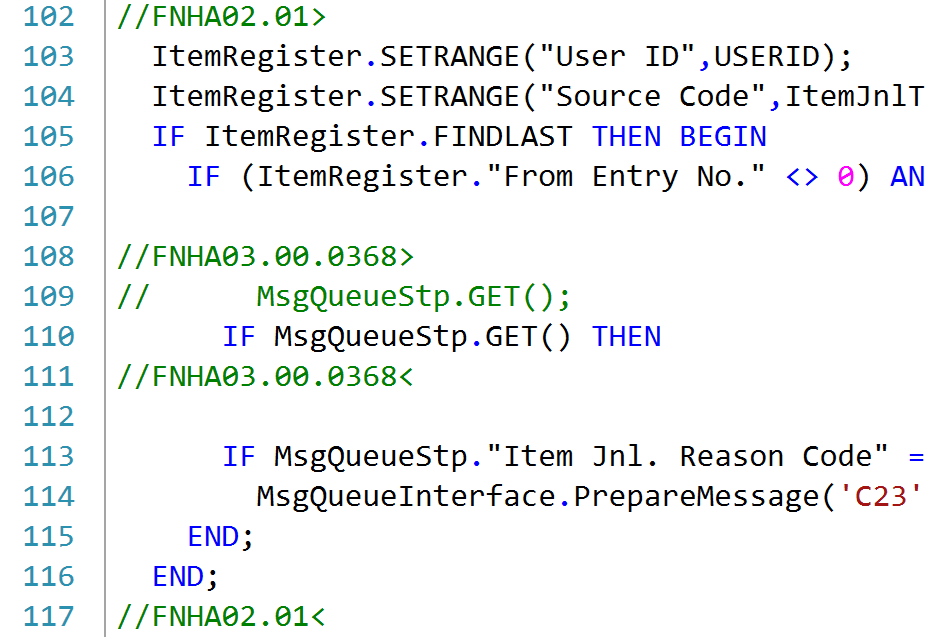
One of good practices of writing C/AL Code for Microsoft Dynamics NAV since the dawn of civilization was annotating (commenting) code changes. If you are not sure what I mean by that, this is what I am talking about:
While standards varied about > vs +, or < vs -, or what the annotations should include, there was absolute consensus that annotating changes is an absolute must.
And it was a must. It was such an important rule that everyone followed it without questions asked. In my career, I’ve seen one or two situations of somebody changing or deleting a line of code without leaving any comment, and I’ve seen quite a lot of code, believe you me. It was that important.
It was that important in fact that it was one of the first things developers learned when they signed up for the job, and it was one of the rules they all followed from their first day.
So far I’ve shown how to configure gulp to help you with some basic JavaScript development tasks, such as bundling and minifying, and how to automate builds on every source file change. Let’s now take it to an entirely new level: debugging.
If you ever tried to debug your control add-in source code using Visual Studio Code, you might have realized two things: first, that it’s actually pretty simple to do; and second, that it’s not the kind of debugging that you want.
Let’s see why that is.
First, using VS Code with a browser such as Chrome, Edge (especially “Canary”, mmmm) or Firefox is easy. There are debugging extensions built for that purpose that allow you to either launch a browser with VS Code attached as a debugger, or to attach VS Code to a running instance of a browser (some browser configuration needed beforehand). However, when you use VS Code as a debugger like this, it’s hardly more than a glorified browser built-in developer tool – the only benefit of using VS Code is that, well, you are in VS Code, rather than inside the browser. However, you are not really debugging your source files – you are debugging scripts currently loaded in the browser. You can’t set debug breakpoints in your source files – you can only set them in copies of files that are loaded by the browser. If you catch a bug (kind of a point with a debugger) you can’t stop the process and immediately change the line where the bug is, but you have to first locate the matching source script, and then the offending line, and then fix it there. Not exactly a fun pastime.
And that’s annoying enough if you have a single script to work with, but if you have several scripts, bundled together, then minified, well, good luck with that. Debugging minified code is as close as you can get to inquisition-level torture in this century.
So, let’s fix this mess, and let’s enable debugging as it should be – let’s enable debugging of actual source files with full breakpoint integration and all.
That’s what my next branch is about. In it, I introduce source maps and how you can use gulp to build them. And then I explain how you can configure your VS Code to debug your source files.