You know what’s supposed to be unique? Snowflakes. Fingerprints. And GUIDs.
A GUID (Globally Unique Identifier) is mathematically designed to be so astronomically unique that if you generated one hundred billion GUIDs per second, you’d still have a better chances of being struck by lightning twice and then winning the lottery, all on the same day, than generating a duplicate.
And yet, here we are. Talking about duplicate App IDs in Business Central.
Long time no see, but that’s how it gets every now and then, I guess… Anyway, I am still alive, still kicking, just don’t get to blog as much as I’d hope for, it’s work, and life and universe and everything.
So, I am back with not a typical “Vjeko” post, just a simple AL opinion piece. A tip, without a trick.
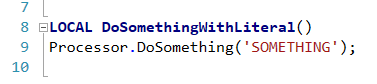
One of the problems we’ve all suffered from in the old days of C/AL (who remembers that still, anyway) was inability to define real text constants. One thing we all avoided was using hardcoded Text literals, like this:
It was not only about the sheer scariness of using Text literals in C/AL, stuff that if left unchecked could cause process issues, something nobody in the ERP world (especially those on the business end of it) likes. Arguably, the worst thing about this kind of code was total lack of reusability. If you had to reuse the literal, you would have to write it again:
Yeah, the mismatch (or typo, whatever you prefer) is intentional to prove my point. You could mistype it, or somebody may decide to change it and then forget to change it in all places, or… stuff happens, you know. It was no good.
There were no constants, and it sucked.
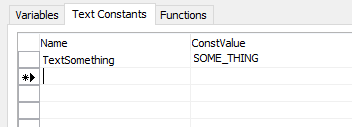
Yeah, yeah, there *were* TextConst constants, but that’s not it. The moment you did this:
… somebody could come in and “fix” it like this:
And there was no way for you to prevent them. There goes your discoverable extension, things break up and your users start yelling your way.
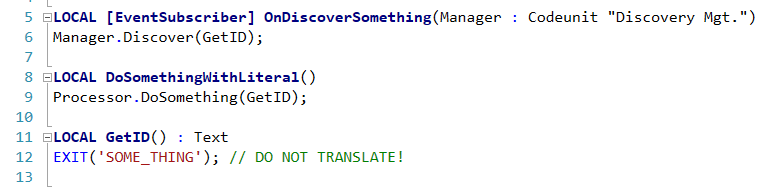
Back in those pre-historic days, I’ve seen people work around this problem like this:
The “constant” is coded in one place, other place call the wrapper function, and world goes on. That was the way to do it in C/AL, truly.
Fast forward back to present. I’ve got myself in the middle of refactoring a chunk of code migrated from C/AL to AL a while ago. It’s full of “pluggable” things that identify themselves to various discoverers, and it’s full of “constants” coded with this function-that-returns-a-hardcoded-literal pattern.
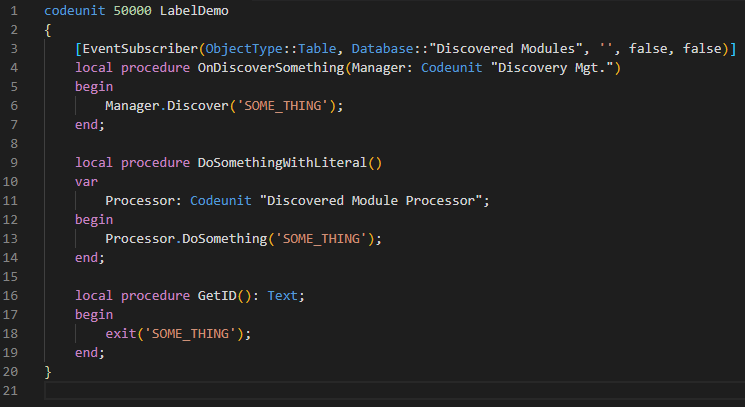
While this worked miracles in C/AL, in AL we actually have a far better way to handle this. Labels. Yeah, fells like I am discovering hot water or sliced bread or something, but please, for the record, don’t do this:
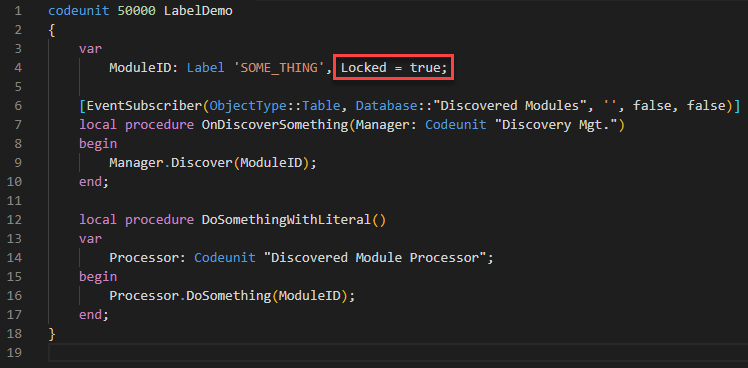
Instead, do this:
If you set the Locked property to true, you are making sure nobody inadvertently translates it, and you keep it a bit cleaner. This is especially true if you have multiple constants – listing them in your var block will be much cleaner than creating a function a piece.
Here endeth the lesson. No rocket science, just an easy one to document my train of thoughts for posterity. Everyone is entitled to my opinion, after all 😁
Those of you who know me, know that a big part of what I do is delivering talks at conferences. Talks, workshops, demos, that kind of stuff. More often than not, quite a lot of time goes into preparation of demos and labs, and also more often than not, the stuff that I prepare just remains in the digital piles of my Dropbox, and fades into oblivion.
For three events this year (two Red Carpet events, and one Directions event) I’ve had a chance to prepare some demos and hands-ons around AI and Business Central, covering both what comes out of the box, and custom integration with things that are not a part of the standard.
Today, my MVP friend Dmitry Katson asked me if I could share with him the hands-ons I prepared. And so I thought – why not just share it with everyone? So, here it goes:
I’ve put all of the stuff I prepared in this GitHub repo, so if you want to play around with this a little bit, you’re welcome.
Probably the most important stuff there is the hands-on exercises (you’ll have them both in PDF and Word format) with (if my memory serves me well) more than 100 of pages of hands-on stuff, that took me quite a while to prepare, test, and write up. Some of it is not up-to-date, because the Azure tools used to manage that stuff changes daily, but you should be able to complete most of those exercises without any issues.
There. Done. I hope you can find any use of this. If not, just yell at me here and tell me how useless I’ve become
Just in case you have fallen victim of the confusion I see often in online communities, blogs, but also Microsoft official documentation: Dynamics 365 Business Central sandbox is not the same as Dynamics 365 Business Central preview. They are two different things. Keep in mind, in this blog post I am not talking about sandbox container environments (on-prem); I am only talking about online sandbox environments.
This is not pure semantics. Things in sandbox environments (and I mean, real sandbox environments of Business Central) differ from things in preview environments.
In just under two weeks I’ll have to present how to use OAuth 2.0 authentication to call REST APIs of Dynamics 365 Business Central. Should be easy. Not only I have already done OAuth integrations, but there is also a nice step-by-step tutorial by Microsoft specifically done for Business Central. So, I followed the steps to the letter (as much as that was possible), and after all was done, I tried to use Postman to get myself an OAuth 2.0 token for invoking Business Central REST APIs, but it didn’t work. No matter what I did, Postman kept returning this:
(Could not complete OAuth 2.0 login. Check Postman Console for more details.)
So I checked the Postman Console for more details.
(access_denied; Error)
Quite some detail.
After a ridiculous amount of time troubleshooting this, I figured it out. Depending on how your Business Central trial account was configured you may encounter this problem. On top of it add the fact that the documentation isn’t exactly straightforward and at couple of places leaves you (educated-)guessing. So I decided to write this blog in case you (or myself at some future point after I will have forgotten I’ve been in this mess) ever need it.