HelloWorld.al

  • Reading time:2 mins read

Finally. Not quite, but still – finally! We finally get the first public glimpse of future of AL code writing, courtesy of Microsoft Dynamics NAV development team.

As you might know, Microsoft is working around the clock to enable new kind of programming for NAV: using Visual Studio Code instead of Microsoft Dynamics NAV Development Environment. They announced it with due fanfare at Directions US, Directions EMEA, and NAV TechDays, and now the NAV community is biting their fingernails off waiting for Microsoft to actually release the thing.

They said some kind of preview will be made somewhat available sometime in December this year, but for now we have got the first glimpse of the new AL syntax.


Continue ReadingHelloWorld.al

C/AL internals: Some more invalid object states

  • Reading time:6 mins read

If you have followed the posts about how C/AL really executes in NAV, you know that C# and C/AL can sometimes be in a state where C/AL compiles, but C# does not, causing you some headaches during run time.

However, what might not be obvious is that there are situations where C/AL does not compile anymore (typically due to a changed dependency signature, or due to an object that went AWOL) but C# not only compiles, but also happily runs as if nothing is wrong in the first place.

These situations can be confusing, and after having read my original post, my friend Heinz has pointed out to those situations and asked me if I can explain them. So, here it goes.

Continue ReadingC/AL internals: Some more invalid object states

From C/AL to executable: how NAV runs your C/AL code

  • Reading time:10 mins read

A lot of folks write C/AL and never worry about what happens then. C/AL is written, NAV execute is, the story ends. The same way the story ends when you flush a toilet and the tank refills. How exactly? Who cares.

While understanding the inner workings of a toilet flush tank doesn’t necessarily make you more efficient at whatever it was that made you press the flush button in the first place, having a better understanding of exactly how NAV uses your C/AL code throughout its lifecycle is of arguably higher practical value.

Have you ever wondered what exactly happens to your C/AL code when you write it? How exactly does NAV run that stuff? Does it do any run-time interpretation, or does it compile C/AL into native code that runs on a processor? What does just-in-time compilation  mean and does it happen with C/AL? If so, when and why?

If any of these questions bother you, read on. If they don’t bother you, read on because they should bother you. If they don’t bother you because you know the answers, read on still, and then brag by poking holes in my explanation.

Continue ReadingFrom C/AL to executable: how NAV runs your C/AL code

Gentlemen’s agreement pattern, or handling the “Handled” pattern

  • Reading time:11 mins read

I’ve delved deep into design patterns story with my last two blog posts, but I am far from over. The patterns I discussed are the ones we could use up until NAV 2015 (we can still use them, of course!) but some more robust loose coupling (excuse the near-oxymoron) can be achieved with what NAV 2016 brought along: events.

It’s the “Handled” pattern. This pattern comes from Thomas Hejlsberg, a chief architect and CTO of Microsoft Dynamics NAV, and was first described by Mark Brummel on his blog. It’s a powerful loose-coupling pattern that successfully addresses the shortcomings of all design patterns I discussed earlier. I would prefer calling this pattern Event Façade rather than “Handled”, but it’s not my baby to christen.

Let’s take a look.

Continue ReadingGentlemen’s agreement pattern, or handling the “Handled” pattern

Decoupling dependencies in C/AL

  • Reading time:11 mins read

Directions US 2016 (yes, 2016, sorry y’all who got the 2017 link in your mailbox) was quite an event. As Directions always is, a lot of people, enthusiastic about this market we strive to thrive in, and about the product we love no matter the limitations we often face when we aim for better, more scalable architectures.

If anything, it reminded me of a long to-do list I have had around for this blog for a while, and I decided to start cleaning it up. The topic of my main session this year was loose coupling of dependencies (I called it polymorphism, because that’s what I’d ultimately like to see possible in C/AL) and I presented two patterns I came up with during my past few years.

Before I present them here on my blog, I wanted to put them in a broader context: loose coupling. So, this is what this post is all about: explaining what loose coupling is, how to achieve it in C/AL, and why you will not want to live without it ever again.

Continue ReadingDecoupling dependencies in C/AL

Dynamically loading assemblies at runtime

  • Reading time:6 mins read

When you spend more time in C# than C/AL, and you still tell yourself and the world around you that you are developing for NAV, then this post is for you.

I already wrote a three-article series about “DLL hell” and how to resolve it, and in my last post in the series (https://vjeko.com/sorting-out-the-dll-hell-part-3-the-code) I delivered some code that help you take control of your .NET assemblies.

This time, I am delivering an updated solution, one that solves all the problems others, and myself, have encountered in the meantime.

So, fasten the seatbelt, and let’s embark on another .NET interoperability black belt ride.

Continue ReadingDynamically loading assemblies at runtime

Getting out of the DateTime mess, or how to get Utc DateTime in C/AL

  • Reading time:3 mins read

Today at work I was trying to untangle one big bowl of spaghetti called DateTime. It’s the C/AL DateTime I am talking about, not System.DateTime from .NET.

The problem with C/AL DateTime is that no matter what you do it’s, according to documentation, “always displayed as local time”.

Another problem with C/AL DateTime is that C/AL is a bit rude when it comes to System.DateTime: whenever C/AL compiler (or runtime) encounters a value of System.DateTime it’s automatically converted to C/AL DateTime.

When you combine those two problems, you get the following problem: even though System.DateTime is perfectly capable of handling time in both UTC or local kind, C/AL isn’t.

To prove this point, just run this:

MESSAGE(‘Current local time: %1\Current UTC time: %2’,SystemDateTime.Now,SystemDateTime.UtcNow);

It will show this:

image

And I am currently sitting in a UTC+1 time zone, mind you.

Continue ReadingGetting out of the DateTime mess, or how to get Utc DateTime in C/AL

What’s New in NAV 2016: Splitting Atoms with TryFunction

  • Reading time:11 mins read

If this was a joke, then it would be one of those good-news-bad-news jokes. So which one do you want first? To stay true to all jokes of this kind, I’ll start with good news first.

Good news is, you now have TryFunctions, that return true if no error happens, and false if an error happens inside them.

And the bad news? You’ll never want to use them.

Continue ReadingWhat’s New in NAV 2016: Splitting Atoms with TryFunction

Server Extensibility Demos

  • Reading time:1 min read

Yesterday, as a part of Microsoft’s Road To Repeatability program, I delivered a live meeting session about server extensibility in NAV in which I focused on certain areas of .NET Interoperability and Web Services that in my opinion align well with the R2R message.

As promised, here are the materials from the presentation:

I provide this as-is, with no comments, documentation or anything – you are free to use any of these materials in your projects, and I welcome your questions here about presentation content and demos. I’ll do my best to answer them on my earliest convenience.

I hope you enjoyed the presentation yesterday (if you were attending) and that you find these materials useful.

Continue ReadingServer Extensibility Demos

How To Update a Class Or Assembly Reference in C/AL And Retain Event Trigger Code

  • Reading time:3 mins read

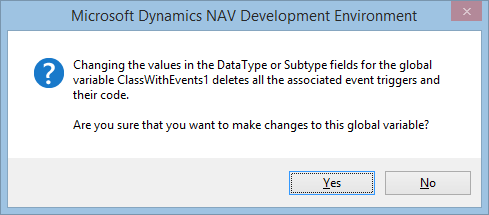
When you reference a .NET class that exposes events, and you switch on the WithEvents property, C/SIDE creates the event triggers for you. If you later want to update the reference to the .NET class, for whatever reason (like, there is a newer version of the assembly), updating the reference will actually delete the event triggers with all the code in them.

To be fair to this non-feature, at least it warns you politely:

image

This is not something you experience once in a geologic era. When you are developing your own assemblies, this will happen fairly often – as often as you add or remove events to/from your classes, and you want to reflect that in the Development Environment. Or as often as you increase the version of your assembly.

Unfortunately, there is no way in the Development Environment to update the reference while actually retaining the event triggers or code in them.

But still, there is a way, and a fairly easy way at that.

Continue ReadingHow To Update a Class Or Assembly Reference in C/AL And Retain Event Trigger Code