Statical Prism – a simple, but practical C/AL code analyzer

  • Reading time:1 min read

Yesterday, thanks to @sforkmann and his blog at navision-blog.de, I have learned of the existence of Statical Prism. I’ve given it a try today, and I am pretty happy – that was just the tool I needed.

I won’t give a complete overview of it here, I’ll just explain that it’s a tool that reads your text object file, and then allows you to analyze the objects and the code, and to find object usages (where used).

It’s greatest advantage is that it is extremely fast – it has loaded a heavily customized 9K+ object solution in under half a minute and provided me with capability to search for object usages – quite a useful thing, badly missing from C/SIDE (Development Environment).

I’ve immediately fallen in love with this tool, and I am surprised that it has been around for more than a year, and I haven’t seen it yet. Shame on me!

Continue ReadingStatical Prism – a simple, but practical C/AL code analyzer

Detect file encoding in C/AL using .NET Interop

  • Reading time:3 mins read

When importing files using XMLports, and especially when handling text files, file encoding is important. If the XMLport expects ASCII, and you feed it UTF-8, you may get scrambled data. If you have mismatching unicode input files, it may just fail altogether. Therefore, making sure that encoding is correct before you actually start gobbling input files might be important.

At least it was for me. I am currently automating data migration for a major go-live, and I am feeding some 30 input files to NAV, and I want to make sure they are all encoded correctly before I enter a process which would take another geological era to complete.

Detecting encoding is not something that pure C/AL can help you with, so I naturally went the .NET way. My position is that there is nothing a computer can do that .NET cannot. My another position is that there is no problem that I have that nobody before me ever had. Combining these two, we reach a yet another position of mine, that there is nothing that computer can do, of which there is no C# example, and typically I look for those on http://stackoverflow.com/

So, here’s the solution.

Continue ReadingDetect file encoding in C/AL using .NET Interop

A .NET Interoperability Lesson: Mapping indexed properties to C/AL

  • Reading time:5 mins read

Indexed properties are commonly used in C# because they allow a lot of syntactical flexibility, and make the code more readable, and easier to follow. Indexed properties are very similar to C/AL array indexing, except for two important differences:

  • In C/AL, indexer is always 1-based. In C#, indexers are 0-based.
  • In C/AL, indexer is always an integer. In C#, indexers can be any type.

These two examples show these differences:

image

Continue ReadingA .NET Interoperability Lesson: Mapping indexed properties to C/AL

Trick: Instantiating any control in a Control Add-in

  • Reading time:5 mins read

My two last blog posts tackled two aspects of working with control add-ins: making any property or method accessible to C/AL, and making any event accessible to C/AL The first was a simple trick, the second was a bit more complex. Together, these two tricks enable you to easily interact with whatever Windows Forms control the add-in shows: you can access any of inner control’s members – properties, methods, or events. At this stage, there is a very simple, but robust framework in place, which lets you publish any kind of control and make it fully available to C/AL. Cool.

But, couldn’t we make it a bit cooler? How about being able to instantiate any control, and having C/AL decide which control to instantiate, instead of hardcoding it in the C# code?

Yes, we can do this.

Continue ReadingTrick: Instantiating any control in a Control Add-in

Trick: Subscribing to any Control Add-in event through pure C/AL

  • Reading time:12 mins read

So, it worked. I found just enough spare time to try out the crazy idea I mentioned in the last post. It’s about control add-ins and events. In the last post I gave a tip about exposing the actual control as a property decorated with ApplicationVisible, which allowed you to directly access all properties and methods of the control.

However, if you wanted to do the same with the events, you had no other option but to manually create an event handler for each event type, then to add an event handler for the actual event from the original control, and finally to raise the event on your control add-in from the event handler for the actual control. You lost me already, so did I Smile

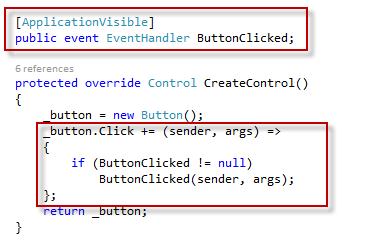
This is what I am talking about. Imagine a button, and that you want to allow NAV to respond to its Click event. This is what you need to do:
image

Might not seem too much, but consider that you must do this for every single event that you want to use, that it requires some rewrite-restart-redeploy-redesign-rebind workout to implement support for another event you forgot last time, and then it becomes an problem. Probably the ugliest part of it all is the fact that for C/SIDE to properly insert the new event triggers for an updated class, you have to unbind the Control Add-in, and then to re-bind it. This loses any C/AL code in previously existing triggers. Add to the equation the human error variable, which kind of readily pops up whenever manual code duplication is involved, and you’ll have a lot of happy hours fixing the mess and juggling dlls and C/AL code back and forth.

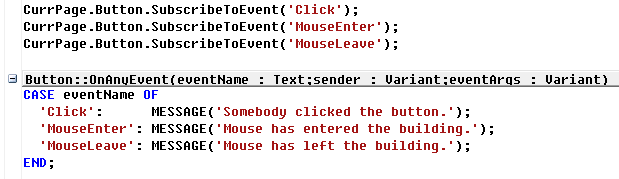
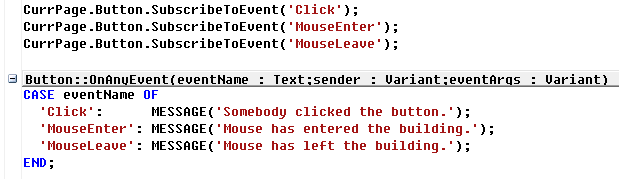
How about this. How about not having to add anything at all to your C# source code, and not having to redeploy anything, and then to support any event you want just through a single line of C/AL code?
image

Yes. That’s what this blog post is about.

Continue ReadingTrick: Subscribing to any Control Add-in event through pure C/AL

DotNet Quick Tip: Accessing members with invalid names

  • Reading time:2 mins read

A friend asked my by e-mail today about a problem he encountered with DotNet interop: how to access a property of an object, if the property name matches a reserved word in NAV. A simplest example is from the Microsoft.Dynamics.Nav.SMTP.SmtpMessage class that comes bundled with NAV 2013.

Consider this piece of code:

Mail := Mail.SmtpMessage;
Mail.To := 'john.doe@noname.no';

If you try to compile this, it will fail. It’s simple: the To property name is invalid in the C/AL context, because it is a reserved word.

So, how do you fix it?

Continue ReadingDotNet Quick Tip: Accessing members with invalid names

Some tips and hints about temporary tables

  • Reading time:7 mins read

MP900433071[1]Temporary tables in NAV are a great thing, and are frequently used, but there are some misconceptions about them. I see developers do the same mistakes time after time and again. In this post I’ll address some common misconceptions and give some tips and hints that you can use in practice.

There may be a lot of basics for you here, in which case just skip to the end: there I give you a nice tip about how to prevent accidental changes to physical tables when you expect that a table is temporary, and in fact it is not.

Continue ReadingSome tips and hints about temporary tables

Generics in .NET Interop for NAV 2013

  • Reading time:6 mins read

image.NET Framework is full of programming conceptual gems, that are now at the fingertips of us poor C/AL folks. One of those is generics. However, the C/AL support for generics at the first glance seems rather limited, and the help file says that you can’t specify data types, and that all generics will be instantiated with System.Object as their type. However, with Microsoft Dynamics NAV 2013, there is a very simple way which allows you to use generics with other data types, as well. So, if .NET Framework Interoperability interests you a slightest bit, here’s a solution. The example below will be for the System.Collections.Generic.Dictionary<,>, and I will show how to use instances of the Dictionary<,> object with any desired data type, without having to pull in any external assemblies.

Continue ReadingGenerics in .NET Interop for NAV 2013

Passing strongly-typed data to Web services

  • Reading time:3 mins read

imagePassing strongly-typed data to NAV Web services can be trickier than it seems. If you are lucky, you can make your method accept strongly-typed parameters, and you are good to go. However, if you just can’t avoid sending text data, your text must be encoded in EN-US format, otherwise it will cause problems (see this).

What the heck, just encode the data as EN-US, right? Not quite. There are a myriad of reasons why data can come in non-EN-US encoding, one of which is this: it’s the Web services, for Pete’s sake – anyone or anything can call them.

Continue ReadingPassing strongly-typed data to Web services

The Beauty and The Beast: NAV and .NET

  • Reading time:9 mins read
imageIf there wasn’t one already, someone should have invented Belgium. There are two things in this world that I love, and probably shouldn’t (and an oversized red speaker’s shirt I got from Luc today did a darned god job at concealing the unlucky consequences of overly indulging in both of them): beer and chocolate. Boy, do Belgians know their beer and chocolate!

But they know their NAV, too, and after NAV TechDays 2011, which have just ended in Antwerp, and two days of top NAV content, I can only say – great job, Luc and the team, and please make it a tradition.

If you attended my presentation about .NET interoperability, then there are a couple of demos I couldn’t deliver due to time constraints, and I promised to blog it. So, here we go.

It’s about streams. You already know that in NAV there are two data types, InStream and OutStream, that allow you to stream data in and out of generic sources or destinations. They are a fantastic tool, because they require you to know nothing about the type of source or destination, and you can store and retrieve data without having to care if the data comes from Internet, or a BLOB field, or is it written to a file, or transported over an XMLport. Stream makes it abstract and allows you to simply handle the data, and make the object itself care about the specifics.

Continue ReadingThe Beauty and The Beast: NAV and .NET