Tip: Interacting with the actual .NET Control Add-in controls

  • Reading time:2 mins read

The control add-in framework in NAV 2013 is great, because apart from allowing you to put a custom Windows Forms control on the page, it also allows you to interact with it through properties, methods, and events. In my classes I typically create a custom text box control that exposes a property to set the background color on the text box. It only takes adding a property of type Color, decorating it with the ApplicationVisible attribute, and you are ready to play.

However, if you want to enable setting all properties or invoking all of the methods the control supports, you could start wrapping the internal control into new ApplicationVisible properties and methods. There is no end to this.

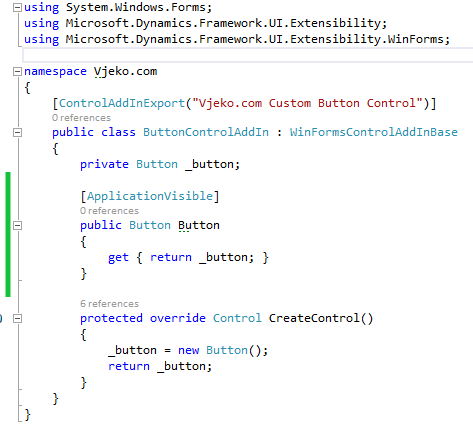
Even though this is an incredibly simple concept, it just never crossed my mind: why not exposing the whole control as an ApplicationVisible property – this would in turn enable you to access the whole control, all its properties and methods (unfortunately, not the events – the delegates are still not supported in C/AL) without having to write a single additional line of code.

I give full credit here to my friend John who gave me thins hint. Thanks, John!

Here’s a practical example: you have a custom button control add-in that looks more or less like this:

image

Why not appending this little piece of code (marked green):
image

It costs nothing, but it allows you to do things like this:

image

Or like this:

image

Or, why not, like this:

image

Even though the C/AL Symbol Menu will not give you access to any of the inner control directly, all the members are still there for you to access.

Again, as I said – you can’t subscribe to events. This is one of those limitations of .NET Interoperability I wrote about last year that I hope get sorted out at some point in future.

However Smile However… an idea has just crossed my mind and I’ll keep fingers crossed that I have enough time to try it out. If it works out, my next blog post will explain just that – subscribing to just about any event the inner control exposes.


Continue ReadingTip: Interacting with the actual .NET Control Add-in controls

.NET Tips & Tricks: Mediator Pattern (on steroids)

  • Reading time:4 mins read

When I was writing my last post I had a distinct feeling that I was trampling over some boundaries of good NAV design. After all, you should not do stuff like that, NAV isn’t meant to do things like that, or at least that was how I felt.

And then two things happened.

First, I asked myself: what the heck, why not? What exactly is NAV meant to do, and why not things like that? If folks at Vedbæk didn’t provide an out-of-the-box solution for the problem, why should the problem stay unsolved?

Second, my dear friend and a fellow MVP, Hrvoje of Hudo’s Vibe, identified the thing as the mediator pattern. So, the thing I’ve done to NAV, civilized world has been doing to their programming environments for a long time.

And then I decided to take it all to a different level altogether, and expand the simple class which didn’t do much but raise events on itself when its method was called, into a full-scale framework. And here it is, the mediator pattern incarnated into a brand new Dispatcher class, adapted to NAV, and with features that make it truly flexible. I do not dare starting to think what are all the situations where you could put this thing to use in NAV.

Read on.

Continue Reading.NET Tips & Tricks: Mediator Pattern (on steroids)

Excel Interoperability Woes in NAV 2013

  • Reading time:4 mins read

Handling Excel files in NAV 2013 (including R2) is not as easy as it seems at first. The Excel Buffer table – an obvious choice of the old days – supports only Open XML format (*.xlsx), and Excel Interoperability implementation seems a bit buggy (check the comments in my old post about .NET interoperability: https://vjeko.com/blog/the-beauty-and-the-beast-nav-and-net). You can still use automation, but then you must handle everything, or at least most of it, on the client end. And, to make it all just a bit worse, none of these approaches, even when they work, will impress you with their speed. All in all, if you want to handle legacy Excel files (*.xls) you will have to make some compromises.

Last week, Mark asked me for a bit of help on a project where he had to import *.xls files into NAV 2013, and he hit all of the possible walls provided by the Excel Buffer, .NET Interoperability components for Excel, and automation walls possible.

When I gave Mark my solution, he said: you should blog about this. So, here I am, blogging about a simple way to read data from Excel, any version, lightning fast.

Continue ReadingExcel Interoperability Woes in NAV 2013

NAV TechDays 2013 in Antwerp Wrap Up

  • Reading time:3 mins read

Another NAV TechDays is over, and again, needless to say, it was a splendid conference. Thanks to everybody who attended one of my sessions about .NET Interoperability: the pre-conference workshop for beginners, the session for beginners, and the advanced, or as I like to call it, the “Black Belt” session.

As I promised, I’m making all materials available for download here on my blog, and Luc will also make the recordings available from Mibuso.

Continue ReadingNAV TechDays 2013 in Antwerp Wrap Up

Top 10 things I miss in .NET Interoperability in NAV 2013

  • Reading time:14 mins read

If you ask me what the top addition to the NAV technology stack over the past few years is – it’s .NET interoperability. A lot of folks, maybe you as well, would disagree, and say it’s Web services. They are important. But if you are a NAV developer, Web services don’t make your life any easier. You are programming for Web services when your requirements tell you so, but that’s it. You don’t experience those moments of truth, when it dawns on you, when you go eureka, slap your forehead and say: now this is something I solve with Web services! Not quite.

But with .NET interoperability, it’s a different story. If you know how to harness its power, there is no single project you’ll ever want to go without using .NET. It opens the door to the most powerful development framework for Windows, and it makes many impossible things possible, in pure C/AL.

There are two kinds of things in this world. Those that .NET Interoperability can do, and those it can’t. Microsoft has been steadily improving it since the initial release in 2009 R2. However, there is still much to be desired. Those small things that you cut in C# in seconds, and twist your brain inside out for hours before you realize you can’t do it in C/AL. Some of them may be in a backlog somewhere in Vedbæk, but I don’t know that, so I decided to compile a list of top 10 things I believe C/SIDE should support, and it doesn’t.

Continue ReadingTop 10 things I miss in .NET Interoperability in NAV 2013

How Do I… Videos on MSDN

  • Reading time:2 mins read

imageMSDN has started running a series of the How do I… videos for Microsoft Dynamics NAV 2013 (feed here). The idea is to showcase a technical feature in 5-15 minutes. The project is still ongoing, but a number of videos have just been released and announced on the Microsoft Dynamics NAV Team Blog.

The project is a joint effort by Plataan and Microsoft, and I participated as a technical expert in charge of seven videos. I’ve already recorded five of them, out of which three are online.

You can find the links below, and please come back to this page as I’ll update it as more videos are published.

Continue ReadingHow Do I… Videos on MSDN

Benchmarking Results: NAV 2013 Outperforms All Previous Versions

  • Reading time:17 mins read

imageMarketing is nice as long as it matches the reality. With Microsoft Dynamics NAV 2013, Microsoft has promised a lot of improvements, but how well does NAV 2013 stand the reality test?

Apparently, outstandingly well.

Over the past two days, I have intensively tested NAV 2009 and NAV 2013 through a series of five different tests that measure different aspects of NAV data handling. My conclusion is clear: NAV 2013 is faster than any NAV you have ever seen, including the Classic client on the native database.

Continue reading to find out more about my findings and testing approach.

Continue ReadingBenchmarking Results: NAV 2013 Outperforms All Previous Versions

Top 5 SQL Server Improvements in NAV 2013

  • Reading time:5 mins read

imagePerformance is one of those things you can’t get enough of and NAV is one of those systems where an extra operation per second is always welcome. Yesterday, during the Expert Panel at the NAV day of the Decisions Spring conference, there was a question: is there any improvement in how NAV 2013 works on SQL Server.

And the answer is: oh yeah!

As a matter of fact, everything is new and improved.

Jörg has already posted an overview of the news of NAV on SQL Server in his last blog post, but I still think there’s room for a couple of more words on the really amazing palette of news and improvements.

Continue ReadingTop 5 SQL Server Improvements in NAV 2013

Unlimited Text Length in NAV 2013

  • Reading time:1 min read

imageHave you noticed already that in Microsoft Dynamics NAV 2013 the text variables can have unlimited length? That’s quite a leap ahead of the previous versions which couldn’t handle more than 1024 characters per variable. If you wanted to achieve bug-free code then, when you were assigning texts around, you had to concatenate the result down to the MAXSTRLEN of the target text.

Not anymore.

The trick is to simply not declare the Length property on text variables. If you declare a variable of type Text, and then leave the Length empty, it means – unlimited.

Don’t worry – you won’t kill NAV by eating up all the available memory. Underneath C/AL there is .NET now, and strings in .NET are of unlimited length, or better yet – unlimittable – length anyway. Strings will only make things slow if you stuff the revised version of King James’s Bible in them. In all practical situations, there will be absolutely no performance penalty of leaving Texts unlimited.

I don’t know about you, but from tomorrow morning, I won’t be setting Length to my Texts.

Continue ReadingUnlimited Text Length in NAV 2013

NAV 2013 beta mini-launch at Adriatics Community

  • Reading time:1 min read

Microsoft Comomunity CroatiaIf you want to learn more about the upcoming release of Microsoft Dynamics NAV 2013, and you are from Zagreb, or don’t mind coming to it, the next community event of Microsoft Dynamics Community Adriatics will be fully dedicated to NAV 2013.

There are going to be two presentations. In the first one on the topic of “What’s new in application functionality”, hosted by Ivan Koletić, a member of Microsoft Dynamics NAV product team, who will give an overview of new application features in NAV 2013, and by now you should already know there are plenty.

The second presentation will be about “What’s new in technology”, and will be hosted by me. I won’t be doing any deep-dive this time, and I’ll provide a cloud-perspective overview of a myriad of architecture changes and technology improvements in NAV 2013.

Both of these presentations are merely going to be an introduction in the series of the presentations that will follow over the next several community events. It’s going to be an exciting summer and fall.

If you would like to attend, then please register your attendance (for free, of course) at the event homepage. We are looking forward to seeing you there!

Continue ReadingNAV 2013 beta mini-launch at Adriatics Community