Decoupling dependencies in C/AL

  • Reading time:11 mins read

Directions US 2016 (yes, 2016, sorry y’all who got the 2017 link in your mailbox) was quite an event. As Directions always is, a lot of people, enthusiastic about this market we strive to thrive in, and about the product we love no matter the limitations we often face when we aim for better, more scalable architectures.

If anything, it reminded me of a long to-do list I have had around for this blog for a while, and I decided to start cleaning it up. The topic of my main session this year was loose coupling of dependencies (I called it polymorphism, because that’s what I’d ultimately like to see possible in C/AL) and I presented two patterns I came up with during my past few years.

Before I present them here on my blog, I wanted to put them in a broader context: loose coupling. So, this is what this post is all about: explaining what loose coupling is, how to achieve it in C/AL, and why you will not want to live without it ever again.

Continue ReadingDecoupling dependencies in C/AL

Directions US 2016: Goodbye, Phoenix!

  • Reading time:3 mins read

Directions US. What more to say than: wow! This was an amazing conference, again. A lot of people, a lot of vibe, a lot of NAV. And this year, a lot to look forward to.

Microsoft didn’t disappoint with the news. Dynamics 365 is here with new paradigms, apps are the new big thing, and they really are. There are a lot of improvements in NAV 2017, in the technical stack and in the application alike, and there is a new code editor, something the geeky part of the NAV community has been waiting for a long time. All in all, quite something.

As always at Directions, I was busy. This year I got two sessions, and both of them went well. Thanks to all amazing people who participated and shared their thoughts and encouragement. The good tradition calls for me to post my content here on my blog, so here we go.

Continue ReadingDirections US 2016: Goodbye, Phoenix!

Long time, no see

  • Reading time:1 min read

Time flies, eh? It seems you folks have been busier here on my blog than I was. Four months whooshed by since I last posted something here, and I have been so busy that it seems like a week.

Today I decided to use my last hours in Phoenix, Arizona, after a successful Directions US and before my flight back home to Croatia, to post my impressions of the conference together with the content from my session, but then I realized I had quite some work to do to approve and reply on comments.

So, that’s what I am up to now. Thank you all who commented and patiently waited for me to turn up here to do what bloggers should do regularly. I am sorry, I’ll try to not make it happen again.

And then, when I am done, I’ll post the stuff I promised to post, so – stay tuned.

Continue ReadingLong time, no see

OnAfter table event subscriber patterns and antipatterns

  • Reading time:6 mins read

The purpose of events is to simplify business logic customization while not impeding upgradeability and general extensibility. However, there is one particular class of events that may cause troubles: OnAfter* table events. There are four of them: OnAfterInsert, OnAfterModify, OnAfterDelete, and OnAfterRename.

If you need them, you must be careful.

Continue ReadingOnAfter table event subscriber patterns and antipatterns

NAV performance part 4: SQL Azure

  • Reading time:7 mins read

SQL Azure is a very interesting service. It’s as interesting as it is misunderstood both in terms of how exactly it works, and what it’s intended to be used for.

First of all, it’s not really the same thing as SQL Server that you install on your box, virtual or physical. It certainly provides the same functionality, and from functional perspective most of things you can do with SQL Server, you can do with SQL Azure. But it behaves in so many different ways that you can’t truly compare them side by side.

Another thing is what SQL Azure was designed for. It’s designed for massive cloud workloads where concurrency is more important than sheer speed. And in that respect it is just brilliant. However, to get most out of it, you have to write and optimize your database access code specifically to take advantage of its features and behavior, otherwise, you simply get performance that can be qualified as mediocre at best.

What happens when you put NAV on SQL Azure? Well, that’s something that you certainly can do – Microsoft does it as well. The thing is – it works. It leaves a bit to be desired if you intend to run heavy processing, but my firm conviction – having tested it and having gone medieval on it with my tests.

Let’s take a look.

Continue ReadingNAV performance part 4: SQL Azure

NAV performance part 3: Azure VM configurations

  • Reading time:7 mins read

While NAV has traditionally mostly been a domestic animal, it’s now getting pushed more and more cloudwards. A large number of partners and customers are considering Azure VMs as their platform of choice as it has many benefits over purchasing and running the whole show in your own basement.

So, I have tested several Azure VM configurations to show what A, D, and G tiers bring to the show, and how much those numbers next to tier letters really mean.

These were the contestants:

  • A2
  • A7
  • D2
  • DS13
  • GS3

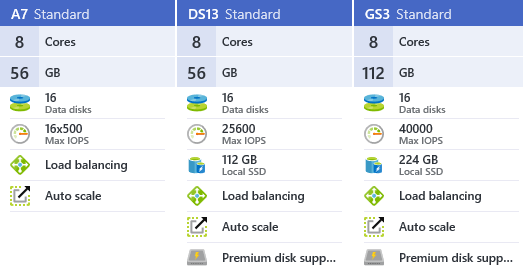
I chose A7, DS13 and GS3 because they all have fairly similar resources:

image

The only significant difference here is that DS13 and GS3 use premium disks, while A7 uses standard disks, however there is also some difference in hardware configurations. G tier has much better processors than D tier, which has better processors than A tier.

The other two contestants are somewhat undersized and I used them to check if those configurations can cope with sustained pressure:

image

And, there is an unexpected guest in this roundup: the DS13 machine with SQL Azure P11. It’s an oversized and unbelievably expensive options, and the reason why I put it here is that it’s the only SQL Azure configuration that can remotely hope to compete with VM deployments of SQL.

Let’s see the results.

Continue ReadingNAV performance part 3: Azure VM configurations

NAV performance part 2: On-prem configurations

  • Reading time:3 mins read

On-prem is where NAV has ran for ages, and where it will still primarily run for a while more. So I test several on-prem configurations with different processors, disks, and memory, to see how these configuration behave in scenarios I described in the original post.

I don’t have too many different hardware configurations to test, but I do have those

  • An i7-3770 machine with two OCZ Vertex4 SSD disks and a Western Digital Caviar this or that, and 32 GB of RAM.
  • An i7-6700K machine at 4GHz with two Samsung M2 950 SSD disks (at 2.5 GB/s read and 1.5 GB/s write speed), two Samsung EVO Pro 850 (at 500 GB/s read/write), and a Seagate something or other 8TB drive, and 64 GB of RAM.

All in all, I tested these configurations with:

  • Data and log being on different SSD disks.
  • Data and log being on the same SSD disk.
  • Data and log being on the same magnetic HDD drive.

Let’s see the results.

Continue ReadingNAV performance part 2: On-prem configurations

NAV performance in various configurations

  • Reading time:8 mins read

Yes, I have been a lazy blogger lately. With so many people blogging about NAV nowadays, it’s really difficult to come up with original content all the time.

Let venture a little bit out of my .NET and JavaScript comfort zone, and hang around a more formidable beast: SQL. And as you know, SQL comes in many shapes. It comes in shape of your rack server, or in shape of your laptop. But it also comes in shape of clouds. Many clouds.

So, I decided to test performance of NAV under various configurations, including on-prem, Azure VM and SQL Azure, and share my findings with you. And while I am writing these lines, there are four machines sweating the crap out under some performance test code I recently wrote.

Continue ReadingNAV performance in various configurations

Dynamic certificate validation when calling Web services

  • Reading time:1 min read

There are situations when you’ll want to call Web services from C/AL, and those Web services might be protected by certificate that your local machine cannot validate directly. Web service might be secured with a self-signed certificate, or by a certificate obtained from an authority that is not globally trusted.

In all those situations, you might need to have a facility to validate certificates yourself. That’s something that’s at the fingertips of all C# developers through the ServerCertificateValidationCallback delegate. However, in C/AL, delegates are unfortunately not (yet) supported.

A friend of mine had this specific problem today, so I remembered that a short while ago I made a “how do I” video on this specific topic. Thanks, Mathias, for giving me a prod, and reminding me of a quick blog topic.

Here’s the link: https://youtu.be/NW_ZiW6J790

Continue ReadingDynamic certificate validation when calling Web services

Dynamically loading assemblies at runtime

  • Reading time:6 mins read

When you spend more time in C# than C/AL, and you still tell yourself and the world around you that you are developing for NAV, then this post is for you.

I already wrote a three-article series about “DLL hell” and how to resolve it, and in my last post in the series (https://vjeko.com/sorting-out-the-dll-hell-part-3-the-code) I delivered some code that help you take control of your .NET assemblies.

This time, I am delivering an updated solution, one that solves all the problems others, and myself, have encountered in the meantime.

So, fasten the seatbelt, and let’s embark on another .NET interoperability black belt ride.

Continue ReadingDynamically loading assemblies at runtime