Control Add-ins and Version Compatibility

  • Reading time:1 min read

(Update, 20.4.2015: As it turns out – this post is not entirely accurate, as pointed out by Johannes Sebastian. Please read the next post to learn more about which parts are, and which aren’t correct.)

Control Add-ins written in C# are not cross-version compatible. You cannot use an assembly compiled for 2013 R2 with 2015 (or the opposite way around, or any other version combination for that matter) without recompiling it with correct extensibility framework assembly reference.

Control Add-ins written in JavaScript don’t have to be recompiled, are mostly interchangeable, and are (so far) guaranteed to be forward compatible. You can always use a version built for 2013 R2 in 2015. You can use a version built for 2015 in 2013 R2, but the opposite way around is only true if you don’t use any of the new JavaScript extensibility features not supported in earlier versions.

Continue ReadingControl Add-ins and Version Compatibility

Overloading Methods With JavaScript Control Add-ins

  • Reading time:3 mins read

Switching from C# to JavaScript to develop your control add-ins might get you scratching your head more often that your scalp, or nails for that matter, might be happy with.

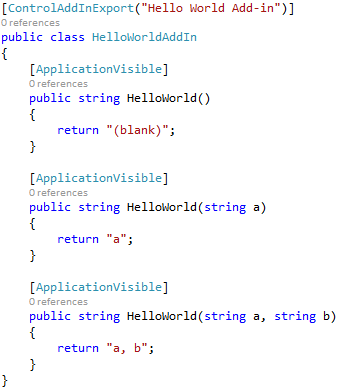
One of those is overloading. In C#, this is a no-brainer:

However, when you want to do that in JavaScript, if you are not a JavaScript developer, making this work is not as straightforward as a regular JavaScript Joe would find it.

Continue ReadingOverloading Methods With JavaScript Control Add-ins

How To Update a Class Or Assembly Reference in C/AL And Retain Event Trigger Code

  • Reading time:3 mins read

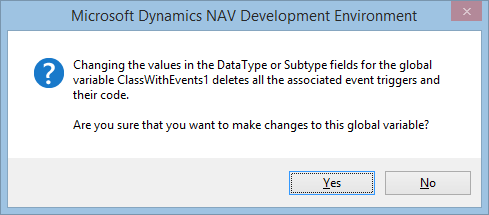
When you reference a .NET class that exposes events, and you switch on the WithEvents property, C/SIDE creates the event triggers for you. If you later want to update the reference to the .NET class, for whatever reason (like, there is a newer version of the assembly), updating the reference will actually delete the event triggers with all the code in them.

To be fair to this non-feature, at least it warns you politely:

image

This is not something you experience once in a geologic era. When you are developing your own assemblies, this will happen fairly often – as often as you add or remove events to/from your classes, and you want to reflect that in the Development Environment. Or as often as you increase the version of your assembly.

Unfortunately, there is no way in the Development Environment to update the reference while actually retaining the event triggers or code in them.

But still, there is a way, and a fairly easy way at that.

Continue ReadingHow To Update a Class Or Assembly Reference in C/AL And Retain Event Trigger Code

Formatting for XML

  • Reading time:1 min read

When you have to format C/AL variables (numbers, dates/times, booleans) for exchange with other apps, call FORMAT(variable,0,9) instead of simply FORMAT(variable). The format 9 formats the variable according to XML standards, and this value can then be interpreted correctly on any system with any regional settings. This is useful also when passing string-formatted values from C/AL to C# or JavaScript.

Continue ReadingFormatting for XML

How do I: Demo Microsoft Dynamics NAV

  • Reading time:1 min read

A couple of weeks ago, a new page was created on PartnerSource – the “Demo Microsoft Dynamics NAV” page. You can access it at http://aka.ms/demonav

The page contains (at the time) two scripts and two How Do I videos that help you establish a demo NAV 2015 environment on Azure, in Office 365. The whole process is highly automated and you can get up and running in a matter of minutes. When I say “up an running” I mean this: having a virtual machine running on Azure, with NAV 2015 accessible through Windows, Web, and Tablet client, with single sign-on to Office 365, and a nice demo SharePoint Online portal with several reports from NAV.

If you haven’t yet – give it a try.

Continue ReadingHow do I: Demo Microsoft Dynamics NAV