AL Object ID Ninja v1.2.0 – plus some Azure lessons learned

  • Reading time:17 mins read

First things first. Yesterday evening, I’ve released AL Object ID Ninja v1.2.0 and there is really nothing new that you’d care about, functionally speaking. Check the changelog if you will, but trust me, you won’t be really blown away. But yes, unfortunately, it did merit a full minor version rather than just a patch number increase.

That’s it. If you only care about what’s new, then this is where you stop reading. But if you care to know what kind of a rocky ride I’ve had yesterday wrestling with Azure and fighting like mad to keep this service free, then read on.

I won this fight, by the way 😎
Continue ReadingAL Object ID Ninja v1.2.0 – plus some Azure lessons learned

More about ISEMPTY

  • Reading time:6 mins read

I had much second thought about whether I should even blog this one. You know, it so profoundly belongs in the Duh! category that I have actually created the Duh! category specifically for this post.

Now, fasten your seatbelt. I apologize for what you are about to see,  but apparently people do write code as the example below. And I sh*t you not, you can’t really make this crap up, but this is what people do:

IF NOT Cust.ISEMPTY THEN
  REPEAT
    DoSomethingStupid(Cust);
  UNTIL Cust.NEXT = 0;

Wat?

Continue ReadingMore about ISEMPTY

When you just must COUNT, no matter what

  • Reading time:5 mins read

I started with blogging about COUNT = 0 situation. Then I followed it with COUNT = 1. So, let’s do a COUNT = 2 today. No, no, I am just kidding, don’t worry 🙂 But I still have to do one more COUNT post, one that will cover all other COUNT situations.

Believe it or not, sometimes you really, honestly, do need to perform an actual COUNT. You just need to know exactly how many of rows there are. It may be 0, 1 or 75 or whatever, but you need to know exactly how many. These situations are few and far between, but every once in a long while this is what you need.

So, let’s give the COUNT function one last kick from another angle.

Continue ReadingWhen you just must COUNT, no matter what

The “IF COUNT = 1” Conundrum

  • Reading time:9 mins read

If you haven’t read my yesterday’s post, then do that first.

Good. At this point you are extremely smart because you know that you should never use COUNT = 0 but should use ISEMPTY instead.

However, what if:

IF SomeTable.COUNT = 1 THEN
  DoSomething();

Well, if this is what you need, then that’s what you need. And that’s exactly what we needed in the team a few days ago.

Continue ReadingThe “IF COUNT = 1” Conundrum

Are there any records there?

  • Reading time:4 mins read

It’s been a while that I haven’t blogged, and my queue grows inversely proportional to the amount of time I have available for blogging, so let me do a short series of easy stuff, simply to take it off the list.

This is not about new features, crazy new tips and tricks or anything of the sort. It’s just a couple short lessons on performance and how to reduce your carbon footprint and make the planet last longer.

It’s about how to properly ask the database: are there any records there?

Continue ReadingAre there any records there?

NAV performance part 4: SQL Azure

  • Reading time:7 mins read

SQL Azure is a very interesting service. It’s as interesting as it is misunderstood both in terms of how exactly it works, and what it’s intended to be used for.

First of all, it’s not really the same thing as SQL Server that you install on your box, virtual or physical. It certainly provides the same functionality, and from functional perspective most of things you can do with SQL Server, you can do with SQL Azure. But it behaves in so many different ways that you can’t truly compare them side by side.

Another thing is what SQL Azure was designed for. It’s designed for massive cloud workloads where concurrency is more important than sheer speed. And in that respect it is just brilliant. However, to get most out of it, you have to write and optimize your database access code specifically to take advantage of its features and behavior, otherwise, you simply get performance that can be qualified as mediocre at best.

What happens when you put NAV on SQL Azure? Well, that’s something that you certainly can do – Microsoft does it as well. The thing is – it works. It leaves a bit to be desired if you intend to run heavy processing, but my firm conviction – having tested it and having gone medieval on it with my tests.

Let’s take a look.

Continue ReadingNAV performance part 4: SQL Azure

NAV performance part 3: Azure VM configurations

  • Reading time:7 mins read

While NAV has traditionally mostly been a domestic animal, it’s now getting pushed more and more cloudwards. A large number of partners and customers are considering Azure VMs as their platform of choice as it has many benefits over purchasing and running the whole show in your own basement.

So, I have tested several Azure VM configurations to show what A, D, and G tiers bring to the show, and how much those numbers next to tier letters really mean.

These were the contestants:

  • A2
  • A7
  • D2
  • DS13
  • GS3

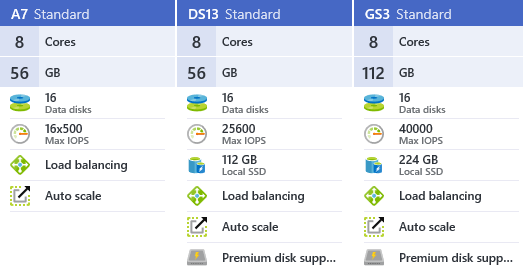
I chose A7, DS13 and GS3 because they all have fairly similar resources:

image

The only significant difference here is that DS13 and GS3 use premium disks, while A7 uses standard disks, however there is also some difference in hardware configurations. G tier has much better processors than D tier, which has better processors than A tier.

The other two contestants are somewhat undersized and I used them to check if those configurations can cope with sustained pressure:

image

And, there is an unexpected guest in this roundup: the DS13 machine with SQL Azure P11. It’s an oversized and unbelievably expensive options, and the reason why I put it here is that it’s the only SQL Azure configuration that can remotely hope to compete with VM deployments of SQL.

Let’s see the results.

Continue ReadingNAV performance part 3: Azure VM configurations

NAV performance part 2: On-prem configurations

  • Reading time:3 mins read

On-prem is where NAV has ran for ages, and where it will still primarily run for a while more. So I test several on-prem configurations with different processors, disks, and memory, to see how these configuration behave in scenarios I described in the original post.

I don’t have too many different hardware configurations to test, but I do have those

  • An i7-3770 machine with two OCZ Vertex4 SSD disks and a Western Digital Caviar this or that, and 32 GB of RAM.
  • An i7-6700K machine at 4GHz with two Samsung M2 950 SSD disks (at 2.5 GB/s read and 1.5 GB/s write speed), two Samsung EVO Pro 850 (at 500 GB/s read/write), and a Seagate something or other 8TB drive, and 64 GB of RAM.

All in all, I tested these configurations with:

  • Data and log being on different SSD disks.
  • Data and log being on the same SSD disk.
  • Data and log being on the same magnetic HDD drive.

Let’s see the results.

Continue ReadingNAV performance part 2: On-prem configurations

NAV performance in various configurations

  • Reading time:8 mins read

Yes, I have been a lazy blogger lately. With so many people blogging about NAV nowadays, it’s really difficult to come up with original content all the time.

Let venture a little bit out of my .NET and JavaScript comfort zone, and hang around a more formidable beast: SQL. And as you know, SQL comes in many shapes. It comes in shape of your rack server, or in shape of your laptop. But it also comes in shape of clouds. Many clouds.

So, I decided to test performance of NAV under various configurations, including on-prem, Azure VM and SQL Azure, and share my findings with you. And while I am writing these lines, there are four machines sweating the crap out under some performance test code I recently wrote.

Continue ReadingNAV performance in various configurations

How I Reduced Data Upgrade Time By 78 Hours

  • Reading time:6 mins read

Upgrade projects are lots of fun. They are full of challenges that keep you busy day and night all the time.

I have encountered a very interesting challenge on my last upgrade project. The object upgrade process was completed, the data upgrade procedure ready to go, but when we started first tests we realized that the data upgrade execution takes some 39 hours to complete just Step 1. Without even bothering to measure Step 2, we realized we need to do something about it. The customer is running a 24/7 business, and cannot accommodate for such a large downtime, just to upgrade data from NAV 2009 R2 to NAV 2013 R2.

Eventually, we got it down to under a second. If you want to learn how, read on.

Continue ReadingHow I Reduced Data Upgrade Time By 78 Hours