Three Whys about .NET Interoperability

  • Reading time:5 mins read

Once upon a time, a smart bloke named Saikichi Toyoda came up with a 5 Whys troubleshooting technique. It postulates that you only need to ask “why” five times to get to the root cause of any problem in a cause-and-effect sequence.

However, with .NET Interoperability in Microsoft Dynamics NAV (pick your version here), I’ve only had to ask “why” three times today, and unfortunately I could not get to the root cause, except – poor design decisions.

It all has to do with a simple .NET class: System.DBNull. The first “why” is simple: why is there no support for fields on .NET types. The second “why” is even simpler: why don’t we have a null constant in C/AL. And the last “why” downright falls into the “what the heck” category: why did somebody think it was a smart idea to replace DBNull value with null.

Continue ReadingThree Whys about .NET Interoperability

Detecting current object type and ID using some funky .NET Interop

  • Reading time:6 mins read

Did you ever need to identify the current object type and ID, programmatically, from within the object? For example, detecting the current table ID in a table trigger like this guy? Or current codeunit ID from inside the codeunit?

Why would you need something like this? If you are inside a trigger in, say, table 18, you do know that you are in the table 18, and you can refer to it as 18 or DATABASE::Customer, right? Yes, but this is hardcoding. If you move this code to a different table you’d have to change the hardcoded constant to whatever that other table is.

Microsoft was well aware of the need to know the currently running object ID in some cases, because there is the OBJECTID function to the CurrPage and CurrReport built-in objects. However, for tables, codeunits, XMLports, and queries, there is nothing of the sort.

Now, using .NET Interop, you can easily (well, easy is relative) get this info.

Continue ReadingDetecting current object type and ID using some funky .NET Interop

Detect file encoding in C/AL using .NET Interop

  • Reading time:3 mins read

When importing files using XMLports, and especially when handling text files, file encoding is important. If the XMLport expects ASCII, and you feed it UTF-8, you may get scrambled data. If you have mismatching unicode input files, it may just fail altogether. Therefore, making sure that encoding is correct before you actually start gobbling input files might be important.

At least it was for me. I am currently automating data migration for a major go-live, and I am feeding some 30 input files to NAV, and I want to make sure they are all encoded correctly before I enter a process which would take another geological era to complete.

Detecting encoding is not something that pure C/AL can help you with, so I naturally went the .NET way. My position is that there is nothing a computer can do that .NET cannot. My another position is that there is no problem that I have that nobody before me ever had. Combining these two, we reach a yet another position of mine, that there is nothing that computer can do, of which there is no C# example, and typically I look for those on http://stackoverflow.com/

So, here’s the solution.

Continue ReadingDetect file encoding in C/AL using .NET Interop

A .NET Interoperability Lesson: Mapping indexed properties to C/AL

  • Reading time:5 mins read

Indexed properties are commonly used in C# because they allow a lot of syntactical flexibility, and make the code more readable, and easier to follow. Indexed properties are very similar to C/AL array indexing, except for two important differences:

  • In C/AL, indexer is always 1-based. In C#, indexers are 0-based.
  • In C/AL, indexer is always an integer. In C#, indexers can be any type.

These two examples show these differences:

image

Continue ReadingA .NET Interoperability Lesson: Mapping indexed properties to C/AL

Tip: Interacting with the actual .NET Control Add-in controls

  • Reading time:2 mins read

The control add-in framework in NAV 2013 is great, because apart from allowing you to put a custom Windows Forms control on the page, it also allows you to interact with it through properties, methods, and events. In my classes I typically create a custom text box control that exposes a property to set the background color on the text box. It only takes adding a property of type Color, decorating it with the ApplicationVisible attribute, and you are ready to play.

However, if you want to enable setting all properties or invoking all of the methods the control supports, you could start wrapping the internal control into new ApplicationVisible properties and methods. There is no end to this.

Even though this is an incredibly simple concept, it just never crossed my mind: why not exposing the whole control as an ApplicationVisible property – this would in turn enable you to access the whole control, all its properties and methods (unfortunately, not the events – the delegates are still not supported in C/AL) without having to write a single additional line of code.

I give full credit here to my friend John who gave me thins hint. Thanks, John!

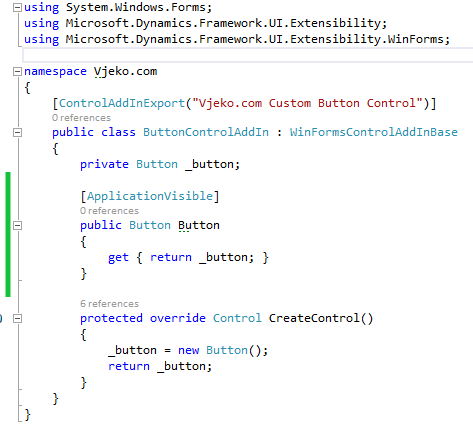
Here’s a practical example: you have a custom button control add-in that looks more or less like this:
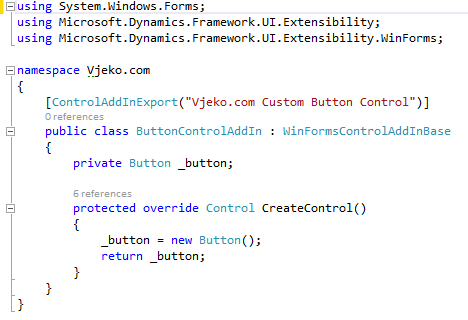
image

Why not appending this little piece of code (marked green):
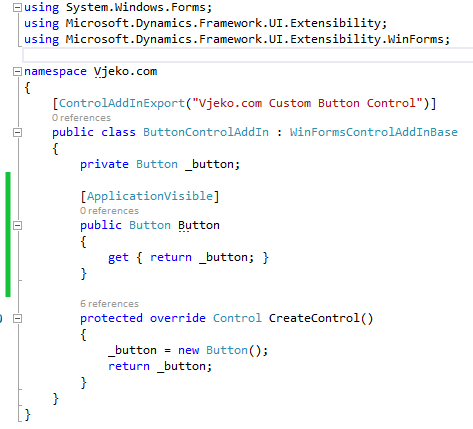
image

It costs nothing, but it allows you to do things like this:

image

Or like this:

image

Or, why not, like this:

image

Even though the C/AL Symbol Menu will not give you access to any of the inner control directly, all the members are still there for you to access.

Again, as I said – you can’t subscribe to events. This is one of those limitations of .NET Interoperability I wrote about last year that I hope get sorted out at some point in future.

However Smile However… an idea has just crossed my mind and I’ll keep fingers crossed that I have enough time to try it out. If it works out, my next blog post will explain just that – subscribing to just about any event the inner control exposes.


Continue ReadingTip: Interacting with the actual .NET Control Add-in controls

.NET Tips & Tricks: Mediator Pattern (on steroids)

  • Reading time:4 mins read

When I was writing my last post I had a distinct feeling that I was trampling over some boundaries of good NAV design. After all, you should not do stuff like that, NAV isn’t meant to do things like that, or at least that was how I felt.

And then two things happened.

First, I asked myself: what the heck, why not? What exactly is NAV meant to do, and why not things like that? If folks at Vedbæk didn’t provide an out-of-the-box solution for the problem, why should the problem stay unsolved?

Second, my dear friend and a fellow MVP, Hrvoje of Hudo’s Vibe, identified the thing as the mediator pattern. So, the thing I’ve done to NAV, civilized world has been doing to their programming environments for a long time.

And then I decided to take it all to a different level altogether, and expand the simple class which didn’t do much but raise events on itself when its method was called, into a full-scale framework. And here it is, the mediator pattern incarnated into a brand new Dispatcher class, adapted to NAV, and with features that make it truly flexible. I do not dare starting to think what are all the situations where you could put this thing to use in NAV.

Read on.

Continue Reading.NET Tips & Tricks: Mediator Pattern (on steroids)

Excel Interoperability Woes in NAV 2013

  • Reading time:4 mins read

Handling Excel files in NAV 2013 (including R2) is not as easy as it seems at first. The Excel Buffer table – an obvious choice of the old days – supports only Open XML format (*.xlsx), and Excel Interoperability implementation seems a bit buggy (check the comments in my old post about .NET interoperability: https://vjeko.com/blog/the-beauty-and-the-beast-nav-and-net). You can still use automation, but then you must handle everything, or at least most of it, on the client end. And, to make it all just a bit worse, none of these approaches, even when they work, will impress you with their speed. All in all, if you want to handle legacy Excel files (*.xls) you will have to make some compromises.

Last week, Mark asked me for a bit of help on a project where he had to import *.xls files into NAV 2013, and he hit all of the possible walls provided by the Excel Buffer, .NET Interoperability components for Excel, and automation walls possible.

When I gave Mark my solution, he said: you should blog about this. So, here I am, blogging about a simple way to read data from Excel, any version, lightning fast.

Continue ReadingExcel Interoperability Woes in NAV 2013

NAV TechDays 2013 in Antwerp Wrap Up

  • Reading time:3 mins read

Another NAV TechDays is over, and again, needless to say, it was a splendid conference. Thanks to everybody who attended one of my sessions about .NET Interoperability: the pre-conference workshop for beginners, the session for beginners, and the advanced, or as I like to call it, the “Black Belt” session.

As I promised, I’m making all materials available for download here on my blog, and Luc will also make the recordings available from Mibuso.

Continue ReadingNAV TechDays 2013 in Antwerp Wrap Up

Long time no see, Vienna, Nashville, demo gods, and other things

  • Reading time:11 mins read

Oh my. Has it really been *THAT* long? Obviously, yes. Some folks have asked me if I stopped blogging. No, I did not. I just took a way long break from it (which will likely resume the instant I hit the Post button), as I was busy working on other things such as How do I videos for NAV (you can look them up on MSDN and PartnerSource), working on the digital learning for NAV (which is partly available on PartnerSource already, and partly will shortly be), preparing and delivering presentations and some other things.

A month ago, I’ve delivered a session at Directions EMEA 2013 in Vienna where I’ve talked about the .NET ineteroperability and Web services tips & tricks, and presented a series of demos (13 of official ones), and then promised to make them available on my blog. The problem was – I honestly intended to make them available, I just didn’t set a deadline. I work best when I have the deadline, but even then it’s not a granted thing.

This time, in Nashville, I was a bit smarter – I’ve actually set myself a pretty demanding deadline, promising my Directions US 2013 audience to actually post this on my blog this very afternoon. So here I am, sitting at the Paisano’s pizzaria and vino terrace, enjoying the kitschy extravagance of a view of a monstrosity of a place called the Gaylord Opryland Hotel & Resort, and writing this to keep up with my commitment.

Gaylord Opryland Hotel & Resort, Nashville, TN

Continue ReadingLong time no see, Vienna, Nashville, demo gods, and other things

Top 10 things I miss in .NET Interoperability in NAV 2013

  • Reading time:14 mins read

If you ask me what the top addition to the NAV technology stack over the past few years is – it’s .NET interoperability. A lot of folks, maybe you as well, would disagree, and say it’s Web services. They are important. But if you are a NAV developer, Web services don’t make your life any easier. You are programming for Web services when your requirements tell you so, but that’s it. You don’t experience those moments of truth, when it dawns on you, when you go eureka, slap your forehead and say: now this is something I solve with Web services! Not quite.

But with .NET interoperability, it’s a different story. If you know how to harness its power, there is no single project you’ll ever want to go without using .NET. It opens the door to the most powerful development framework for Windows, and it makes many impossible things possible, in pure C/AL.

There are two kinds of things in this world. Those that .NET Interoperability can do, and those it can’t. Microsoft has been steadily improving it since the initial release in 2009 R2. However, there is still much to be desired. Those small things that you cut in C# in seconds, and twist your brain inside out for hours before you realize you can’t do it in C/AL. Some of them may be in a backlog somewhere in Vedbæk, but I don’t know that, so I decided to compile a list of top 10 things I believe C/SIDE should support, and it doesn’t.

Continue ReadingTop 10 things I miss in .NET Interoperability in NAV 2013