Control Add-ins Supercharged: Hello, gulp!

  • Reading time:2 mins read

Get ready for the next big step in taking the control add-in development to the next level. Today, I am (re)introducing gulp.

I’ve blogged about gulp in the past, but I’ve never really finished that series. Life and work got in the way. But while I may not have blogged about it much, it’s been my companion for quite some time now, and now I want it to become yours, too.

In previous “Control Add-ins Supercharged” examples we’ve mostly explored how not to do things. Now we are ready to take a look in the opposite direction and start talking about how to do do things.

For this example, I’ll use my next demo branch 04-gulp-hello-world that you can check out here: https://github.com/vjekob/supercharged_01/tree/03-gulp-hello-world.

I don’t intend to copy/paste all the theory explained in the branch’s Readme file, but I’ll just say what you can find there:

  • Steps to install the prerequisites to run gulp
  • Steps to install gulp and make sure it works
  • Examples how to run gulp tasks from both command line and VS Code
  • Just a tiny little bit of theory around Node.js packages
  • A few good practices around some Node.js artifacts that will appear in your workspace once you install gulp

And with this small example that introduces gulp I conclude the introduction into the “Control Add-ins Supercharged” series. All the next steps will deliver ready-to-use stuff that you can plug into your own control add-in development process, and we’ll start building our toolchain step by step.

Have a great weekend!

Continue ReadingControl Add-ins Supercharged: Hello, gulp!

Control Add-ins Supercharged – Frameworks

  • Reading time:2 mins read

In the last example I put online, we’ve noticed that it was difficult to achieve a good separation of concerns in the front end if we are building UI directly through DOM. Apart from the fact that it’s very inefficient, manipulating DOM directly makes it very difficult to structure your front-end logic. You quickly realize you need a framework for that.

And here I come to a big fat point I want to make once again, that I made in my session, too: don’t build a new framework; pick one off the shelf.

The thing is, in the JavaScript world there are ridiculously many frameworks. This article on Hackernoon is an introduction into this total insanity: https://hackernoon.com/how-it-feels-to-learn-javascript-in-2016-d3a717dd577f. There are memes, jokes, comics, websites, even Alexa skills that address the fact that people keep creating new JavaScript frameworks all the time. Guess what? A tiny fraction of them generate any traction at all, and only a few stick.

And don’t get me wrong – I am totally for improving things; “the room for improvement is the largest room in the world” they say. But I am not quite convinced that building a yet another framework will benefit the posterity all that much. If you want to improve on what we have, most of the leading frameworks are open-source, contribute away.

As with previous (and future) posts in this series, there is a GitHub repo + branch that accompanies this blog post, and you can find it here: https://github.com/vjekob/supercharged_01/tree/02-framework

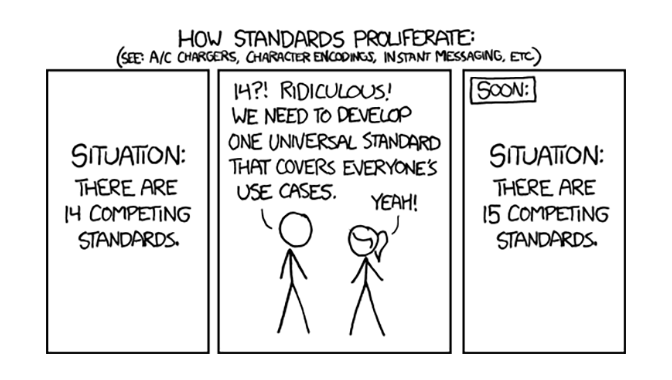
(The featured image used under CC license from https://worldpece.org/content/how-standards-proliferate)

Continue ReadingControl Add-ins Supercharged – Frameworks

NAV TechDays 2019 Goodies

  • Reading time:2 mins read

NAV TechDays is simply the best NAV / Business Central conference there is. I can miss Directions, I can miss other events, but NAV TechDays – no way. There are few events which can match that energy, that community spirit, that enthusiasm, that top-notch deep-dive content. No, there are not few that can match it; there are none that can.

And then when you consider that they manage to attract ever more people to it, all that while publishing all conference content less than a week after conference is over – it just proves to you that the value of NAV TechDays is not in its content or its sessions. Being a part of NAV TechDays has always been an honor, and a pride, and a privilege.

No matter if you were there last week or not, you’ll want to access the conference materials, so here are the links:

Since this is my blog, I’ll also link directly to my Day 1 session about control add-ins development: https://www.youtube.com/watch?v=_IjppPvkmgE

I’ll post the direct link to Waldo’s and mine Day 2 session about APIs as soon as it is available.

Day 2 content is now also available, so here’s the link to Waldo’s and my session about Business Central custom APIs, {ConnectApps}²: https://www.youtube.com/watch?v=9yg-8tLNjzg

Enjoy the content – and see you again next year in Antwerp!

Continue ReadingNAV TechDays 2019 Goodies

Control Add-ins Supercharged – Separating concerns

  • Reading time:2 mins read

If you know me, you know that I am obsessed with separation of concerns. It’s the core principle of good design, and good design is what I am always striving for.

The original Control Add-ins Supercharged example showcased how most of non-web developers (a category into which most of AL developers squarely fall) would develop a control add-in: just stuff everything into a single script, and all is fine. But it isn’t fine, if for nothing else, then because it can be done much better.

My next example is showing how you might attempt to solve the separation of concerns issue. The first step you may take is splitting the single script file into multiple files. For example, you may separate UI logic from state management logic, from AL-to-JavaScript interface logic. However, the example I am presenting today is yet an example of a good solution. It’s in fact a yet another “don’t do it this way” example. There are a few more wrong steps I want to intentionally take before I start solving problems for real, one by one.

The primary issue that my second repo (branch 01-split-js) addresses is that it separates front-end concerns as much as reasonably possible. However, as you will see in the repo description, once you attempt to separate logic into multiple JavaScript files, the separation of concerns isn’t really achieved, and there are a few files where you still have a mish-mash of UI, data, state, events, precisely those things that shouldn’t go together. The problem is, whatever way you attempt to solve it, you soon realize that the solution is just not good enough. As long as you are attempting to generate and maintain your UI using pure DOM, it will be impossible to achieve any decent level of separation of concerns.

So, head over to https://github.com/vjekob/supercharged_01/tree/01-split-js and check out the repo description (and content) and see for yourself why this approach is better than the previous one, but still far from good.

See you soon with the next example.

Continue ReadingControl Add-ins Supercharged – Separating concerns

Control Add-ins Supercharged – Kicking off

  • Reading time:3 mins read

Control add-ins have always been my passion. Not only because I’ve been working with JavaScript since 1996, and I could call it my mother tongue, but because I just love how they allow us to create amazing user interfaces. Business Central has made huge progress in terms of usability of the web client, however it’s still not the most user friendly thing out there, and performing some tasks may be tedious. Control add-ins help because they allow us to develop custom user interface over standard data and processes.

However, when building control add-ins, it’s not only about what we build, but also about how we build it. That was the central tenet of my NAV TechDays 2019 session named “Control Add-in Development Supercharged”, in which I wanted to show how control add-in development can be indistinguishable from modern web front end development. Because that’s exactly what it is – web front end development.

For my session I’ve prepared total of 36 demos. However, I realized just before the session that I won’t be able to deliver all of them, while also delivering all the theory I wanted to present. So I decided to post all of the demo source code for all 36 demos. However, this year I wanted to take a step further: I wanted to not only deliver the code as-is without any explanations, I actually wanted to explain all of it.

And this is what this blog series will be about – how to supercharge the control add-in development and make it as modern as it can possibly get. All with code examples and explanations. In the end, you’ll get a nice tutorial of modern control add-in development, that I hope will help you build your skills and take your control add-in development to the next level.

All code examples and explanations will be in in GitHub, and the first example is already there.

So, head to https://github.com/vjekob/supercharged_01 and check out the first example.

I won’t be posting code explanations here on my blog, I’ll merely be posting about the latest contribution to my GitHub repositories, and will add a line or two to explain what a particular repo or branch are about.

So, today: repository supercharged_01, branch master.

This branch introduces the “Simpler” control add-in and sets the stage for all further demos. It contains a very simple AL extension that contains a control add-in. The control add-in does not provide a feature-complete functionality, but merely showcases how it could be possible to simplify an otherwise less user-friend process. Keep in mind that the control add-in itself does not matter. What matters is its structure and how it was created.

In this branch, the control add-in is done in a “naive” way, how a typical AL developer without much experience in JavaScript or web development would develop it.

Stay tuned for (far) more content over the following days and weeks – it takes time to explain 36 demos in detail.

Continue ReadingControl Add-ins Supercharged – Kicking off

Codeunit Interfaces – this time for real!

  • Reading time:1 min read

There is a particular programming language feature that I’ve always missed in AL (and C/AL for that matter): interfaces. I’ve dreamt about it, then blogged about it, then finally created a feature request in Microsoft’s AL GitHub repository. My GitHub feature request caught quite some traction and became the most upvoted feature request in less than a day.

Now, I don’t know if or to what extent it was my submission that influenced Microsoft, but it doesn’t really matter – what matters is that it’s becoming reality. Last week at NAV TechDays, Microsoft has presented an amazing new feature that will be coming to AL pretty soon: interface object type. And it’s official, or at least as official as Microsoft’s keynote is, and you can check Microsoft’s demo yourself at https://youtu.be/pl0LAvep6WE?t=4646

The feature is far more comprehensive than anyone could have hoped for, and it can be used for codeunits and enums, and in the future maybe even for a few more things. Who knows, or dares to dream. I dared, and I am pretty happy I did

Continue ReadingCodeunit Interfaces – this time for real!

NAV TechDays 2019: {ConnectApp}² demos

  • Reading time:1 min read

This year’s NAV TechDays was again an amazing event. More than 1400 participants, 18 sessions, great content, it again surpassed the records set last year. It was an honor and a pleasure to be able to speak again.

This blog post is not about the conference – I am not a news reported This is merely about demos that Waldo and I delivered on November 22, during our session named {ConnectApp}². There were two React Native demos, and I have now published their source code on GitHub:

These demos are provided as-is, and I won’t be blogging about their content in detail – they are just two React Native apps that don’t showcase much by themselves. The “Main Demo” app does – however – contain some examples of how to call Business Central APIs (which was the topic of our session).

Over the course of the next days, I will publish the demos from my “Control Add-ins Supercharged” session as well, so stay tuned.

Continue ReadingNAV TechDays 2019: {ConnectApp}² demos

Microsoft.Dynamics.NAV.InvokeExtensibilityMethod

  • Reading time:8 mins read

Now that you are done through this mouthful of the title, you may recognize that it’s the method you invoke when you want to run a control add-in trigger in AL from JavaScript.

There is nothing new about this method itself, it’s just that most people aren’t aware of full power of this method, and they are using this method in a very inefficient way. In this blog, I want to show you what this method can do for you that you may have not been aware of. And I hope I get you to change your habits.

The syntax is this:

Microsoft.Dynamics.NAV.InvokeExtensibilityMethod(name, args[, skipIfBusy[, callback]]);

It takes at minimum two arguments, and this is what most people invoke it. Obviously, name is the name of the event as declared in the controladdin object that you also must implement as a trigger inside the usercontrol in the page that uses it. Also, args is the array of arguments you want to pass to AL.

Imagine this is how you declare your event:

event SayHello(FirstName: Text; LastName: Text);

Then from JavaScript you would invoke it like this:

Microsoft.Dynamics.NAV.InvokeExtensibilityMethod("SayHello", ["John", "Doe"]);

So far, very simple, obvious, and easy. But here we get to the biggest mistake most people do when invoking the Microsoft.Dynamics.NAV.InvokeExtensibilityMethod method. They invoke it directly. The reason why it’s a mistake is because most often you’ll want to synchronize the invocations between JavaScript and AL as much as you can, and this method – as anything in JavaScript that invokes stuff outside JavaScript – is asynchronous. If you have this:

Microsoft.Dynamics.NAV.InvokeExtensibilityMethod("SayHello", ["John", "Doe"]);
alert("You see me immediately");

… you will see the “You see me immediately” message before AL even gets a chance to start executing.

Yes, you can take advantage of more arguments here to make it behave differently. So, let’s take a look at the remaining two arguments.

The skipIfBusy argument tells the control add-in JavaScript runtime to not even invoke your event in AL if the NST session is currently busy doing something else. If you omit it, the skipIfBusy parameter defaults to false so it means your AL event will be raised, and if AL is already busy, it will be raised as soon as AL stops being busy.

The callback argument, though, is where cool stuff happens. This arguments is of function type (you can imply as much from its name), and it is invoked as soon as AL has finished doing whatever you just made it busy with. So, if you want some JavaScript code to happen after the SayHello event completes its work, you can do it like this:

Microsoft.Dynamics.NAV.InvokeExtensibilityMethod(
  "SayHello",
  ["John", "Doe"],
  false,
  function() {
    alert("You see me after SayHello finished running in AL");
  });

However, that’s not really the most beautiful way of writing JavaScript. That’s how you would write it in late 1990’s, we are now nearly a quarter century ahead. Let’s write some at least tiny little bit less outdated JavaScript, and let’s introduce Promises. Promises are objects which allow you to synchronize asynchronous calls in a syntactically less offensive way than callbacks.

Let’s take a look at why promises are superior to callbacks.

Imagine you want to structure your code nicely, and you don’t want to just call your extensibility methods out of a blue, so you decide to wrap your call into a function, like this:

function sayHello(first, last, callback) {
   Microsoft.Dynamics.NAV.InvokeExtensibilityMethod(
     "SayHello", 
     [first, last],
     false,
     callback);
 }

 // Invoking the function
 sayHello("John", "Doe", function() {
   alert("You see me after SayHello finished running in AL");
 });

The syntax of the sayHello invocation is not really that easy to follow. However, we could translate the entire example to promises:

function sayHello(first, last) {
  return new Promise(resolve =>
    Microsoft.Dynamics.NAV.InvokeExtensibilityMethod(
      "SayHello", 
      [first, last],
      false,
      resolve));
}

// Invoking the function
sayHello("John", "Doe")
  .then(() => alert("You see me after SayHello finished running in AL"));

… and suddenly it becomes more readable. (Okay, a part of it being more readable is that I used arrow functions, but that’s because they are both supported at the same language level of JavaScript, and if your browser supports Promises, it will support arrow functions too, and if it doesn’t support Promises, it won’t support arrow functions either).

Apart from this readability benefit, there is another, far bigger benefit of wrapping your Microsoft.Dynamics.NAV.InvokeExtensibilityMethod invocations into promise-returning wrapper functions: it’s the fact that all promises are awaitable in JavaScript.

In newer versions of JavaScript (EcmaScript 2017 and newer) there is a concept of async functions. Async functions perform some asynchronous work, and you can await on them to make your code look and behave as if it were synchronous.

For example, if you have a function declared as this:

async function somethingAsync() {
  // Do some asynchronous work
}

… then you can invoke it like this:

await somethingAsync();
alert("This won’t execute before somethingAsync completes its async work");

Cool thing about async/await is that it’s nothing more than syntactic sugar for Promises. Every async function implicitly returns a Promise, and you can invoke it either with await syntax, or with .then() syntax. Cosenquently, if a function explicitly returns a Promise, you can await on it as if it were declared as async.

In short, in our earlier example, we could easily do this:

function sayHello(first, last) {
  return new Promise(resolve =>
    Microsoft.Dynamics.NAV.InvokeExtensibilityMethod(
      "SayHello", 
      [first, last],
      false,
      resolve));
}

// Invoking the function
await sayHello("John", "Doe");
alert("You see me after SayHello finished running in AL");

… and it would have exactly the same meaning as the earlier example, except that this time it’s far more readable.

At this stage, our sayHello function is a handy asynchronous wrapper around Microsoft.Dynamics.NAV.InvokeExtensibilityMethod method invocation, but we can do better than that. Instead of having to write wrappers for every single event declared in your controladdin object, you could write something like this:

function getALEventHandler(eventName, skipIfBusy) {
  return (…args) => new Promise(resolve =>
    Microsoft.Dynamics.NAV.InvokeExtensibilityMethod(
      eventName,
      args,
      skipIfBusy,
      resolve));
}

When you have that, you can use it like this:

// Obtain a reference to an asynchronous event invocation wrapper
var sayHello = getALEventHandler("SayHello", false);

// … and then use it as an asynchronous function
await sayHello("John", "Doe");
alert("You see me after SayHello finished running in AL");

Cool, isn’t it? You now not only never have to write that wordy Microsoft.Dynamics.NAV.InvokeExtensibilityMethod ever again (and risk making typos), you also have it fully synchronizable using the await syntax. But we can get even cooler – way cooler – than that. Hold my beer.

You know already that event invocations in AL are void, or that they cannot ever return a value. Your JavaScript cannot invoke AL and have AL return a value to it, that’s just not how AL/JavaScript integration works. At the heart it’s because it’s all asynchronous, but at the end of it, it’s just because Microsoft never cared enough to make it fully synchronized through an abstraction layer that could make it possible. Now that we’ve got it to an awaitable stage, let’s take it to another level by allowing AL to actually return values to your JavaScript wrappers.

Imagine that you declare this event in your controlladdin:

event GetCustomer(No: Code[10]);

You pass a customer number to it, and you want it to return a JSON object containing your customer record information by its primary key. Ideally, you’ll want to invoke it like this:

var cust = await getCustomer("10000");

Of course, that won’t work, because your GetCustomer trigger in AL – once you implement it in a page – cannot return values. You’d have to have a method declared in your controladdin object and then implement that method in the global scope in JavaScript, where you can pass the result of this operation, something you’d declare like this:

procedure GetCustomerResult(Cust: JsonObject);

However, implementing it as a separate function in your JavaScript would require some acrobatics to allow you to retain your await getCustomer() syntax. But this is only true if you take the traditional approach of implementing methods as global-scope-level functions in one of your scripts. In JavaScript, you can implement methods on the fly, so let’s do it.

Let’s start with the statement that the GetCustomerResult function should be available in JavaScript only during the invocation of GetResult event in AL, and invoking it outside of such invocation would be a bug, and should not be allowed. When you do it like this, then you can write your code in such a way that you create this function in JavaScript just before you invoke the AL event, and you delete this function immediately when AL returns the result, something like this:

 function getALEventHandler(eventName, skipIfBusy) {
  return (...args) => new Promise(resolve => {
    var result;

    var eventResult = `${eventName}Result`;
    window[eventResult] = alresult => {
      result = alresult;
      delete window[eventResult];
    };

    Microsoft.Dynamics.NAV.InvokeExtensibilityMethod(
      eventName,
      args,
      skipIfBusy,
      () => resolve(result));
  });
}

You can then do something like this:

// Obtain a reference to an asynchronous event invocation wrapper
var getCustomer = getALEventHandler("GetCustomer", false);

// … and then use it as an asynchronous function
var cust = await getCustomer("10000");
alert(<code>Your customer record is ${JSON.stringify(cust)});

How cool is this?

There is an even further level of awesomeness you can add to your event invocations, and it has to do with the skipIfBusy argument, but that’s a topic for a future blog post, I think you have enough to chew on for now. And I know that at this stage, invoking Microsoft.Dynamics.NAV.InvokeExtensibilityMethod directly, instead of through a pattern such as this, seems very stone age.

Continue ReadingMicrosoft.Dynamics.NAV.InvokeExtensibilityMethod

Tips & Tricks: Going full screen with control add-ins in BC150

  • Reading time:2 mins read

Long time no see here, for I don’t know which time. That’s how it is these days, life kicks in, work kicks in, stuff kicks in, and then time flies and months go between posts here.

I am currently delivering my “Developing Control Add-ins using AL language” workshop at the first pre-conf day of NAV TechDays 2019, and while my group is busy developing their control add-in, I decided to answer the question I got five minutes ago: “can we please have this piece of code”?

So, here it goes. This little trick will allow you to go full screen with your control add-in in BC150. Having a full-screen control add-in is not something that you can do with just setting properties on your controladdin object, but it’s absolutely possible. Also, this is not something you can only do with BC150 – as a matter of fact you can do it in every single version of the Business Central or Dynamics NAV web client (or tablet, or phone client for that matter). However, every single client and every single version has a different overall HTML structure, so this particular trick applies to BC150. It may work on 140, it may work on 160 in the future, but it also may not.

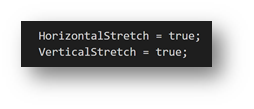
The principle is the same, though: you hide unnecessary screen elements, and you make your control add-in iframe element full width and full height, and that’s it.

This is what your controladdin object must declare:

And then, this is what your control add-in initialization JavaScript code should do (typically you’d put this into your startup script):

function initialize() {
    function fill(frame) {
        if (!frame)
            return;
        frame.style.position = "fixed";
        frame.style.width = "100vw";
        frame.style.height = "100vh";
        frame.style.margin = "0";
        frame.style.border = "0";
        frame.style.padding = "0";
        frame.style.top = "0";
        frame.style.left = "0";
        frame.ownerDocument.querySelector("div.nav-bar-area-box").style.display = "none";
        frame.ownerDocument.querySelector("div.ms-nav-layout-head").style.display = "none";
    }
    
    window.top.document.getElementById("product-menu-bar").style.display = "none";
    fill(window.frameElement);
    fill(window.frameElement.ownerDocument && window.frameElement.ownerDocument.defaultView && window.frameElement.ownerDocument.defaultView.frameElement);
}

And that’s it.

Good luck full-screening!

Continue ReadingTips & Tricks: Going full screen with control add-ins in BC150