Passing JSON from JavaScript to C/AL

  • Reading time:4 mins read

Yesterday, I said I was closing this year of blogging, but I wasn’t really. Closing a year with 39 posts, and leaving a question lingering, wouldn’t be too fair, would it? If you read my last postabout how to pass objects from C/AL to JavaScript, you must have wondered if it’s possible to also pass objects from JavaScript back to C/AL.

Wonder no more. It is. And here’s how.

Continue ReadingPassing JSON from JavaScript to C/AL

Passing strongly typed data to a JavaScript control add-in

  • Reading time:3 mins read

Many cool things often go undocumented. I’ve just stumbled upon one of those, and it comes in handy to close this year of blogging.

Imagine this situation: you have a server-side .NET object, that you want to pass on to the client. With the .NET System.Windows.Forms-based objects, you have to make the object serializable, deploy the object to the client-side Add-in folder, and then set the RunOnClient property on the C/AL variable to Yes.

However, if the client is not .NET-based, if it is a cross-client JavaScript-based one. You may think that it’s not possible to pass the custom object on to JavaScript code. And you may be wrong.

Continue ReadingPassing strongly typed data to a JavaScript control add-in

Goodies from the Control Add-ins session at NAV TechDays 2014

  • Reading time:4 mins read

First of all, thank you all who attended my session today. It was a lot of people in the room, and with the competition from Microsoft talking about a very hot topic in the other, bigger room, I really wouldn’t expect to see all of you there. I hope you found the things you saw useful, and that you’ll take advantage of all the free stuff that I am posting today here on Vjeko.com.

Continue ReadingGoodies from the Control Add-ins session at NAV TechDays 2014

The “Life Hack” from today’s Session

  • Reading time:1 min read

And yes, I almost forgot… Somebody (sorry, I didn’t catch the name) asked me to put my life hack on the blog as well, so here it is. For all of you who were not there, I use this as a template for declaring .NET variables – until Microsoft provides means to declare them in a simpler ways. Inline, anyone?

So – download the life hack, or cheat sheet, here: https://vjeko.com/wp-content/uploads/2014/11/Life_Hack_No_1.docx

Continue ReadingThe “Life Hack” from today’s Session

DEmos from the .NET Interop for Mere Mortals

  • Reading time:1 min read

Thanks to everybody who attended my session today at NAV TechDays 2014 in Antwerp. As promised, here are the goodies from the session. I’ve simply taken the objects and I deliver them here with no explanations or comments – when Luc publishes the sessions and the slide decks on Mibuso, you’ll be able to figure out what’s what. I hope you don’t mind.

I’ve also included my demo from the PRS session today, about the Service Locator pattern. The ZIP file does not include the Visual Studio solution – you can find it in my previous post, that I’ve put here yesterday.

I hope you find these examples useful and that they help you get started with .NET Interop quickly.

Download the files here: https://vjeko.com/wp-content/uploads/2014/11/NAVTechDays2014.MereMortals.zip.

Continue ReadingDEmos from the .NET Interop for Mere Mortals

NAV TechDays 2014 Pre-conference goodies

  • Reading time:1 min read

So, NAV TechDays 2014 have started, again, with the pre-conference sessions that were all sold out and packed full.

Today I had an extraordinary pleasure to teach the advanced .NET Interoperability concepts to 15 people that came from all over the world, from Brazil to Australia. It was an interesting workshop, challenging – I must say (thanks to Rafael who made me improvise a solution to a typical DotNet limitation), and I am looking forward to delivering two more sessions about .NET and Control Add-ins tomorrow, and on Friday.

As promised, I am making the materials from the presentation available for the download, in case you want to learn the same stuff the attendees learned today.

Continue ReadingNAV TechDays 2014 Pre-conference goodies

Do you have a value, Mr. BLOB?

  • Reading time:1 min read

To check if a BLOB field has a value, you call its HASVALUE function. For example: IF Item.Picture.HASVALUE THEN;

In older versions, earlier than NAV 2009, you had to call CALCFIELDS before you could check HASVALUE, which – if you think of it, did not make much sense. This was changed in NAV 2009, so ever since that version you can check HASVALUE before you decide to call CALCFIELDS first. It makes all the sense – you don’t need to pull up to 2GB of data over just to see if anything is inside.

If you are an old-school guy (or just old, as me), and you CALCFIELDS first, HASVALUE next, maybe it’s time for you to reconsider it.

Rembember – the pattern is: IF Field.HASVALUE THEN Rec.CALCFIELDS(Field);

Continue ReadingDo you have a value, Mr. BLOB?

Improving semantics through function properties

  • Reading time:1 min read

Any function that accepts only one parameter can be called as if it were a property, and this applies to built-in system functions, your own custom functions, and even .NET methods alike. Instead of doing it like Report50001.SetDefaultPostingDate(101015D) you can always do it like Report50001.SetDefaultPostingDate := 101015D. Of course you can improve semantics of your code significantly if you simply call the function PostingDate instead of SetDefaultPostingDate, then you can just write Report50001.PostingDate := 101015D;

Remember – this works for all function types, even .NET method calls.

Continue ReadingImproving semantics through function properties

Try..Catch for .NET Interoperability

  • Reading time:10 mins read

While it may be a cold day in hell before we see any TRY..CATCH constructs in pure C/AL, we are all far more lucky when it comes to .NET interoperability. In this blog post I’ll (re)present the same concept I demonstrated during NAV TechDays 2013 last year in Antwerp, because I am quite sure this nifty little trick got lost under piles of other posts on this blog.

So, let’s learn how to do try..catch..finally for .NET interoperability C/AL code, using mostly C/AL code.

Continue ReadingTry..Catch for .NET Interoperability

Adding a ControlAddInReady event to custom controls

  • Reading time:4 mins read

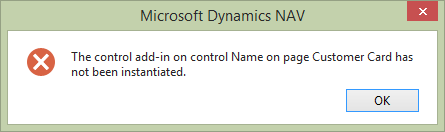
When interacting with custom controls on your pages from C/AL, you must be absolutely sure that the control has been instantiated. If it is not, you’ll get an error such as this:

image

The reason why this happens is that C/AL code gets to execute before the page has been rendered, and thus also before the custom controls have been instantiated.

Continue ReadingAdding a ControlAddInReady event to custom controls