

I’ve been busy over weekend with completing a few work items that were in the cooking for a while. Some have been on my wish-list since day one, some have been brewing since a few years ago. It’s unbelievable how far certain architectural decisions can go, and I am genuinely excited to bring this new version to the daylight: 3.2.1.
So, 3-2-1 go!
App Pools: Finally First-Class Citizens
Let me start with what I’m most excited about, because there’s a lot to unpack here.
App pools have always been second-class citizens in Ninja. Range Explorer didn’t show accurate pool-wide consumption for them. Assignment Explorer didn’t group them or detect lost IDs at the pool level. Diagnostic warnings for unassigned object IDs? Didn’t fire for app pools at all.
That changes today.
Range Explorer now shows pool member apps with accurate pool-wide consumption data – so you can see at a glance how many IDs are used across the entire pool, overlaid on each app’s own ranges. Assignment Explorer now groups pool member apps under a single node and detects lost IDs at the pool level. Diagnostic warnings work for pool apps. All the things that worked for regular apps and didn’t work for pool apps now work for pool apps too.
There’s one honest caveat. The Assignment Explorer’s lost ID detection can only see apps that are actually loaded in your current workspace. If some pool members aren’t open, Ninja can’t see their objects – and it says so, with a notice at the top of the Lost group reminding you the results may be incomplete. So treat that particular view with appropriate skepticism if you don’t have all pool apps open. Everything else is solid.
I have to give proper credit here. David Feldhoff created a PR years ago that tried to tackle exactly this problem. It was a serious, well-intentioned contribution. Unfortunately, it was a really large PR that addressed several interconnected issues at once – some of which went quite deep – and neither David nor I found the time to get it across the finish line. It sat there for a long time. Your work wasn’t wasted, David. It pointed me in the right direction, and some of that thinking is in what shipped today.
The Part That’s More Than a Feature
Now for the bigger story. Because what I just described – Range Explorer, Assignment Explorer, diagnostics – that’s the visible part. The structural part is more interesting.
App Pools are on their way to the backend. Not there yet – .objidconfig still works exactly as before – but the migration has started, and 3.2.1 is the first step.
Why does it matter? Because .objidconfig is a Git-tracked file. And anything in a Git-tracked file that affects more than one developer – or more than the local behavior of Ninja – is, architecturally speaking, a problem waiting to happen. Pool membership declared in .objidconfig has to propagate through every branch, every developer’s checkout, before it actually takes effect everywhere. And even then, stale branches exist. Accidental deletions happen, or someone forgets to pull.
App Pools should have always been a backend-driven, centralized feature. I knew that. I tried to get there multiple times – I even documented one of my attempts publicly, in issue #108, where you can read exactly how far I got and exactly where it fell apart. The problem was always the same: doing this properly required changes deep enough that they would break compatibility for self-hosting users – a class of users I had committed to supporting. Every time I got close to a solution, I found myself back in the same place – deeper in the rabbit hole, further from a clean answer. I tried more than once to find a path that maintained full compatibility and feature parity at the same time. There wasn’t one.
So now I’m doing it in two steps. Step one – which is what 3.2.1 delivered – is that the backend now silently collects pool membership information from what the extension reports during sync. Which app belongs to which pool. This is information that, until now, nobody had true visibility into – especially the users who spread pools across multiple repositories. For the first time, you can open the Ninja portal and actually see your pool structure taking shape. It will populate gradually over the coming weeks as your developers sync.
After about a month of that, once the backend has a reliable picture of who belongs where, a new release will obsolete pool declarations in .objidconfig and shift pool management entirely to the portal. That’s when pool membership becomes a centralized, backend-driven feature the way it should have been from the start.
Consumption Overview Panel
Here’s something new that has nothing to do with pools.
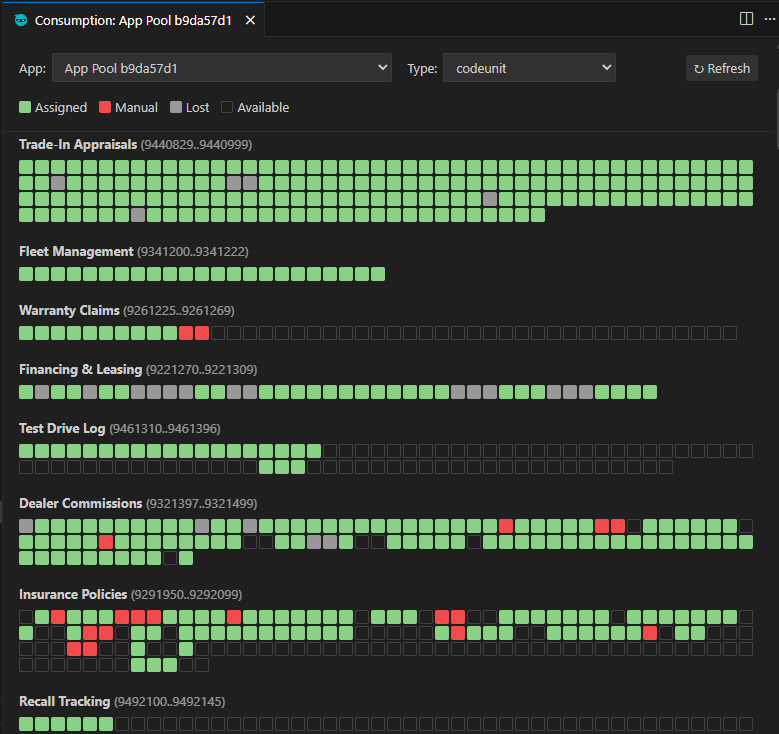
You can now open a visual panel – “Ninja: Show Consumption Overview” from the Command Palette, or by right-clicking a synced app in the Range Explorer – that gives you a grid view of your object ID ranges. Every ID is a colored square: green for IDs assigned and tracked by Ninja, red for objects that exist in your workspace but aren’t tracked (collision risk), gray for IDs tracked by Ninja but without a matching object in your workspace (wasted space), and outline-only for IDs that are still available.
Hover over any square to see the object ID and name. Right-click to act on it – store an untracked assignment, release a lost ID, or jump to the source file. And if you want to renumber an object, you can just drag it to a different square. Ninja takes care of the rest.
The panel works for both individual apps and App Pools, merging data from all pool members that are loaded in your workspace.
It’s one of those features where the moment you see it, you wonder how you managed without it. Range management becomes obvious in a way that no text-based list ever quite achieves.
Per-Folder Settings in Multi-Root Workspaces
I owe you an apology on this one.
When Ninja launched, settings worked at all levels – user settings, workspace settings, everything. At some point, Visual Studio Code introduced scopes for settings, which meant that certain settings could only be configured at specific levels. That breaking change completely flew over my head, and the result was that Ninja settings couldn’t actually be configured per folder through a .vscode/settings.json file in a multi-root workspace. You either applied them globally or through the .code-workspace file.
That’s fixed now. Several settings – Show Range Warnings, Request Per Range, and Disable Deletion Tracking – are now properly scoped as resource-level settings, which means your .vscode/settings.json works the way you’d expect. Each app in a multi-root workspace can have its own configuration.
Private (Self-Hosted) Backend Support Removed
As I announced last week, support for private (self-hosted) backend is gone. I am not happy because of this as I always wanted Ninja to support free usage. I won’t apologize for this anymore, my hand was literally forced here. Either I would slowly let Ninja fade away or I would remove a possibility for anyone to compete with my with my own product.
But there is a large upside to this. I can now fully focus on building great new features and you can expect a lot more of posts like this one, filled with new features, improvements, and goodies that will make life better for everyone. I don’t have to spend any time figuring out impossible workarounds to support two rapidly diverging platforms. One thing I promised when I went commercial was to deliver more value than the price I ask for – and I am staying fully committed to that. Ninja will deliver. I will deliver.
More Cool Features on the Backend (Portal)
There are plenty of news happening on https://alid.ninja/ so let’s talk about that for a moment.
User Roles for Organizations
Organizations can now control who is allowed to do what.
A new opt-in user roles system introduces two levels. Regular users can assign object IDs and use all the everyday features – nothing changes for them. Power Users can additionally perform full syncs and authorize or deauthorize apps. Merge sync, which only adds IDs without removing existing records, remains available to everyone regardless of role.
When a team member without the Power User role tries to do something restricted, they get a clear error message explaining what happened.
Administrators manage this from the Users page in the Ninja portal. Toggle “Enable user roles” to activate, click any user to assign their role, and the change takes effect immediately.
News Section and Extended Grace Period
Two housekeeping items.
The Ninja website now has a News section. There’s a “News” link in the site header, with an unread badge showing how many articles you haven’t read yet.
New and unclaimed apps now get a 30-day grace period instead of the standard 15 days, running until March 23, 2026. After that, it’s back to 15 days. This gives teams extra breathing room while the transition settles.
Help Center
Over 20 new help articles have been added, covering nearly every feature of the extension. If you’ve been navigating Ninja by intuition and the odd blog post, now there’s proper documentation. It’s worth a look.
That’s 3.2.1. Four days well spent, I think. Let me know what you think – or what you want to see next.
