Detecting current object type and ID using some funky .NET Interop

  • Reading time:6 mins read

Did you ever need to identify the current object type and ID, programmatically, from within the object? For example, detecting the current table ID in a table trigger like this guy? Or current codeunit ID from inside the codeunit?

Why would you need something like this? If you are inside a trigger in, say, table 18, you do know that you are in the table 18, and you can refer to it as 18 or DATABASE::Customer, right? Yes, but this is hardcoding. If you move this code to a different table you’d have to change the hardcoded constant to whatever that other table is.

Microsoft was well aware of the need to know the currently running object ID in some cases, because there is the OBJECTID function to the CurrPage and CurrReport built-in objects. However, for tables, codeunits, XMLports, and queries, there is nothing of the sort.

Now, using .NET Interop, you can easily (well, easy is relative) get this info.

Continue ReadingDetecting current object type and ID using some funky .NET Interop

Detect file encoding in C/AL using .NET Interop

  • Reading time:3 mins read

When importing files using XMLports, and especially when handling text files, file encoding is important. If the XMLport expects ASCII, and you feed it UTF-8, you may get scrambled data. If you have mismatching unicode input files, it may just fail altogether. Therefore, making sure that encoding is correct before you actually start gobbling input files might be important.

At least it was for me. I am currently automating data migration for a major go-live, and I am feeding some 30 input files to NAV, and I want to make sure they are all encoded correctly before I enter a process which would take another geological era to complete.

Detecting encoding is not something that pure C/AL can help you with, so I naturally went the .NET way. My position is that there is nothing a computer can do that .NET cannot. My another position is that there is no problem that I have that nobody before me ever had. Combining these two, we reach a yet another position of mine, that there is nothing that computer can do, of which there is no C# example, and typically I look for those on http://stackoverflow.com/

So, here’s the solution.

Continue ReadingDetect file encoding in C/AL using .NET Interop

A .NET Interoperability Lesson: Mapping indexed properties to C/AL

  • Reading time:5 mins read

Indexed properties are commonly used in C# because they allow a lot of syntactical flexibility, and make the code more readable, and easier to follow. Indexed properties are very similar to C/AL array indexing, except for two important differences:

  • In C/AL, indexer is always 1-based. In C#, indexers are 0-based.
  • In C/AL, indexer is always an integer. In C#, indexers can be any type.

These two examples show these differences:

image

Continue ReadingA .NET Interoperability Lesson: Mapping indexed properties to C/AL

Trick: Instantiating any control in a Control Add-in

  • Reading time:5 mins read

My two last blog posts tackled two aspects of working with control add-ins: making any property or method accessible to C/AL, and making any event accessible to C/AL The first was a simple trick, the second was a bit more complex. Together, these two tricks enable you to easily interact with whatever Windows Forms control the add-in shows: you can access any of inner control’s members – properties, methods, or events. At this stage, there is a very simple, but robust framework in place, which lets you publish any kind of control and make it fully available to C/AL. Cool.

But, couldn’t we make it a bit cooler? How about being able to instantiate any control, and having C/AL decide which control to instantiate, instead of hardcoding it in the C# code?

Yes, we can do this.

Continue ReadingTrick: Instantiating any control in a Control Add-in

Trick: Subscribing to any Control Add-in event through pure C/AL

  • Reading time:12 mins read

So, it worked. I found just enough spare time to try out the crazy idea I mentioned in the last post. It’s about control add-ins and events. In the last post I gave a tip about exposing the actual control as a property decorated with ApplicationVisible, which allowed you to directly access all properties and methods of the control.

However, if you wanted to do the same with the events, you had no other option but to manually create an event handler for each event type, then to add an event handler for the actual event from the original control, and finally to raise the event on your control add-in from the event handler for the actual control. You lost me already, so did I Smile

This is what I am talking about. Imagine a button, and that you want to allow NAV to respond to its Click event. This is what you need to do:

image

Might not seem too much, but consider that you must do this for every single event that you want to use, that it requires some rewrite-restart-redeploy-redesign-rebind workout to implement support for another event you forgot last time, and then it becomes an problem. Probably the ugliest part of it all is the fact that for C/SIDE to properly insert the new event triggers for an updated class, you have to unbind the Control Add-in, and then to re-bind it. This loses any C/AL code in previously existing triggers. Add to the equation the human error variable, which kind of readily pops up whenever manual code duplication is involved, and you’ll have a lot of happy hours fixing the mess and juggling dlls and C/AL code back and forth.

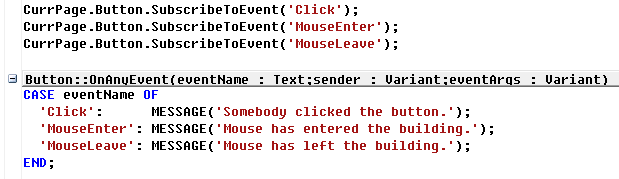
How about this. How about not having to add anything at all to your C# source code, and not having to redeploy anything, and then to support any event you want just through a single line of C/AL code?

image

Yes. That’s what this blog post is about.

Continue ReadingTrick: Subscribing to any Control Add-in event through pure C/AL

Tip: Interacting with the actual .NET Control Add-in controls

  • Reading time:2 mins read

The control add-in framework in NAV 2013 is great, because apart from allowing you to put a custom Windows Forms control on the page, it also allows you to interact with it through properties, methods, and events. In my classes I typically create a custom text box control that exposes a property to set the background color on the text box. It only takes adding a property of type Color, decorating it with the ApplicationVisible attribute, and you are ready to play.

However, if you want to enable setting all properties or invoking all of the methods the control supports, you could start wrapping the internal control into new ApplicationVisible properties and methods. There is no end to this.

Even though this is an incredibly simple concept, it just never crossed my mind: why not exposing the whole control as an ApplicationVisible property – this would in turn enable you to access the whole control, all its properties and methods (unfortunately, not the events – the delegates are still not supported in C/AL) without having to write a single additional line of code.

I give full credit here to my friend John who gave me thins hint. Thanks, John!

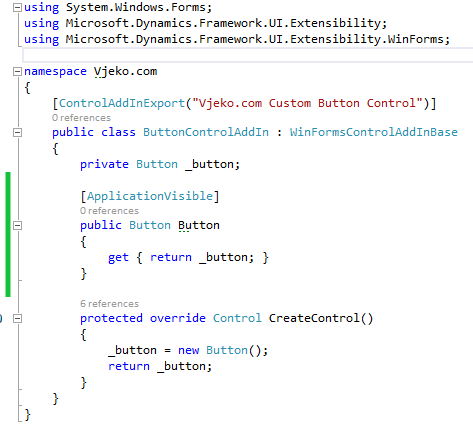
Here’s a practical example: you have a custom button control add-in that looks more or less like this:

image

Why not appending this little piece of code (marked green):

image

It costs nothing, but it allows you to do things like this:

image

Or like this:

image

Or, why not, like this:

image

Even though the C/AL Symbol Menu will not give you access to any of the inner control directly, all the members are still there for you to access.

Again, as I said – you can’t subscribe to events. This is one of those limitations of .NET Interoperability I wrote about last year that I hope get sorted out at some point in future.

However Smile However… an idea has just crossed my mind and I’ll keep fingers crossed that I have enough time to try it out. If it works out, my next blog post will explain just that – subscribing to just about any event the inner control exposes.

Continue ReadingTip: Interacting with the actual .NET Control Add-in controls

Drag and Drop File Upload for Microsoft Dynamics NAV 2013 R2

  • Reading time:4 mins read

Yesterday evening I spoke at Dutch Dynamics Community event, on invitation by my dear friend Luc van Vugt, and the topic was control add-ins for NAV 2013 R2. Of course, this automatically meant that the audience should see more JavaScript code than C# or C/AL, and that it should be something both fancy and useful.

So how about this: you drag and drop a file onto an NAV page, and the file is automatically uploaded and stored in a BLOB field in the NAV database? And yes, it does the same no matter if you call it from the Windows or the Web client. And yes of course, no external components or dependencies needed.

As I promised, I would make all the source components available for download after the sessions, and if you just want to take the components, here they are, ready to download, install and abuse:https://vjeko.com/wp-content/uploads/2014/03/DragDrop.zip

If you want to know how this thing works and why, read on. Otherwise, just download the thingy, install it (the instructions are included with the file) and abuse it to your fancy.

Continue ReadingDrag and Drop File Upload for Microsoft Dynamics NAV 2013 R2

DotNet Quick Tip: Accessing members with invalid names

  • Reading time:2 mins read

A friend asked my by e-mail today about a problem he encountered with DotNet interop: how to access a property of an object, if the property name matches a reserved word in NAV. A simplest example is from the Microsoft.Dynamics.Nav.SMTP.SmtpMessage class that comes bundled with NAV 2013.

Consider this piece of code:

Mail := Mail.SmtpMessage;
Mail.To := 'john.doe@noname.no';

If you try to compile this, it will fail. It’s simple: the To property name is invalid in the C/AL context, because it is a reserved word.

So, how do you fix it?

Continue ReadingDotNet Quick Tip: Accessing members with invalid names

.NET Tips & Tricks: Mediator Pattern (on steroids)

  • Reading time:4 mins read

When I was writing my last post I had a distinct feeling that I was trampling over some boundaries of good NAV design. After all, you should not do stuff like that, NAV isn’t meant to do things like that, or at least that was how I felt.

And then two things happened.

First, I asked myself: what the heck, why not? What exactly is NAV meant to do, and why not things like that? If folks at Vedbæk didn’t provide an out-of-the-box solution for the problem, why should the problem stay unsolved?

Second, my dear friend and a fellow MVP, Hrvoje of Hudo’s Vibe, identified the thing as the mediator pattern. So, the thing I’ve done to NAV, civilized world has been doing to their programming environments for a long time.

And then I decided to take it all to a different level altogether, and expand the simple class which didn’t do much but raise events on itself when its method was called, into a full-scale framework. And here it is, the mediator pattern incarnated into a brand new Dispatcher class, adapted to NAV, and with features that make it truly flexible. I do not dare starting to think what are all the situations where you could put this thing to use in NAV.

Read on.

Continue Reading.NET Tips & Tricks: Mediator Pattern (on steroids)

.NET Tips & Tricks: Dispatcher

  • Reading time:5 mins read

There are situations when you want to exchange data between different objects in NAV, and there is no simple way to do it. One of those, that a friend stumbled upon a couple of days ago goes like this: you have a page which shows a subpage, that is linked to a factbox. Depending on the situation in the lines, you the factbox shows content from one table or another.

Your instincts may yell “ProviderID” at this moment, but there are some problems with it. ProviderID is used to set the link between different part controls on the same page. But if the link from the provider control results in no record being selected in the target part control, then the OnAfterGetRecord trigger in it does not fire, and you cannot update the content.

Another example may be this: depending on the line selected in the lines part, you may want to show either of two factboxes. Imagine – on a sales order, if you are on a line that sells a resource, you want to show the Resource factbox; and if you are on a line that sells an item, you want to show the Item factbox. You get the gist. There are not many ways you can achieve this.

As a matter of fact, when helping my colleague, I couldn’t think of any.

Except for an old trick which, unfortunately, does not work at all in the RTC. In the good old days of the Classic client, when heroes roamed the Earth, you could pass the CurrForm as a reference onto a function in a subform, which would then store the reference to the main form in its own Form variable. Then, when something happened in the lines, and you wanted to let the master page know, you called the function on the stored reference. It worked like charm. However, in NAV 2013 (and possibly 2009 – can’t bother to check) you cannot assign one page variable to another. Furthermore, the CurrPage variable has page ID in some funny range, and does not even correspond to the actual page number. All in all, no way you can pass, or retain, a reference to a page object, let alone the current page reference.

So, how do you have two, three, or more pages (or page parts, for that matter) talk to each other to pass some information when needed, in all those situations when ProviderID simply doesn’t get the job done (I could bore you to death listing those situations)?

.NET interoperability, what else.

Continue Reading.NET Tips & Tricks: Dispatcher