



NAV TechDays 2015 sessions available on Mibuso and YouTube
If you didn’t have a chance to attend NAV TechDays 2015 in Antwerp last month,…
Getting out of the DateTime mess, or how to get Utc DateTime in C/AL
Today at work I was trying to untangle one big bowl of spaghetti called DateTime. It’s the C/AL DateTime I am talking about, not System.DateTime from .NET.
The problem with C/AL DateTime is that no matter what you do it’s, according to documentation, “always displayed as local time”.
Another problem with C/AL DateTime is that C/AL is a bit rude when it comes to System.DateTime: whenever C/AL compiler (or runtime) encounters a value of System.DateTime it’s automatically converted to C/AL DateTime.
When you combine those two problems, you get the following problem: even though System.DateTime is perfectly capable of handling time in both UTC or local kind, C/AL isn’t.
To prove this point, just run this:
MESSAGE('Current local time: %1\Current UTC time: %2',SystemDateTime.Now,SystemDateTime.UtcNow);
It will show this:
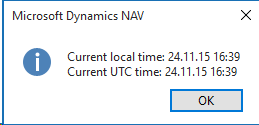 And I am currently sitting in a UTC+1 time zone, mind you.
 And I am currently sitting in a UTC+1 time zone, mind you.
Visual Studio Control Add-in Project Template
If part of your daily job includes creating control add-ins for Microsoft Dynamics NAV, then you know that creating control add-ins that target all clients requires quite a lot manual work. There are a lot of small steps that you must do every time.
To avoid all that work that adds no value, only frustration, here’s a Visual Studio project template that you can use to automate the process of creating a new control add-in.
- Go to the previous page
- 1
- …
- 46
- 47
- 48
- 49
- 50
- 51
- 52
- …
- 161
- Go to the next page